
BUILT-IN PROJECT MESSAGING
Keep conversations where the work happens.
Chat in projects and tasks, coordinate your team, or send direct and group messages. Keep questions, replies, and shared files together.
Start FreeFree forever for teams of up to 3 members.
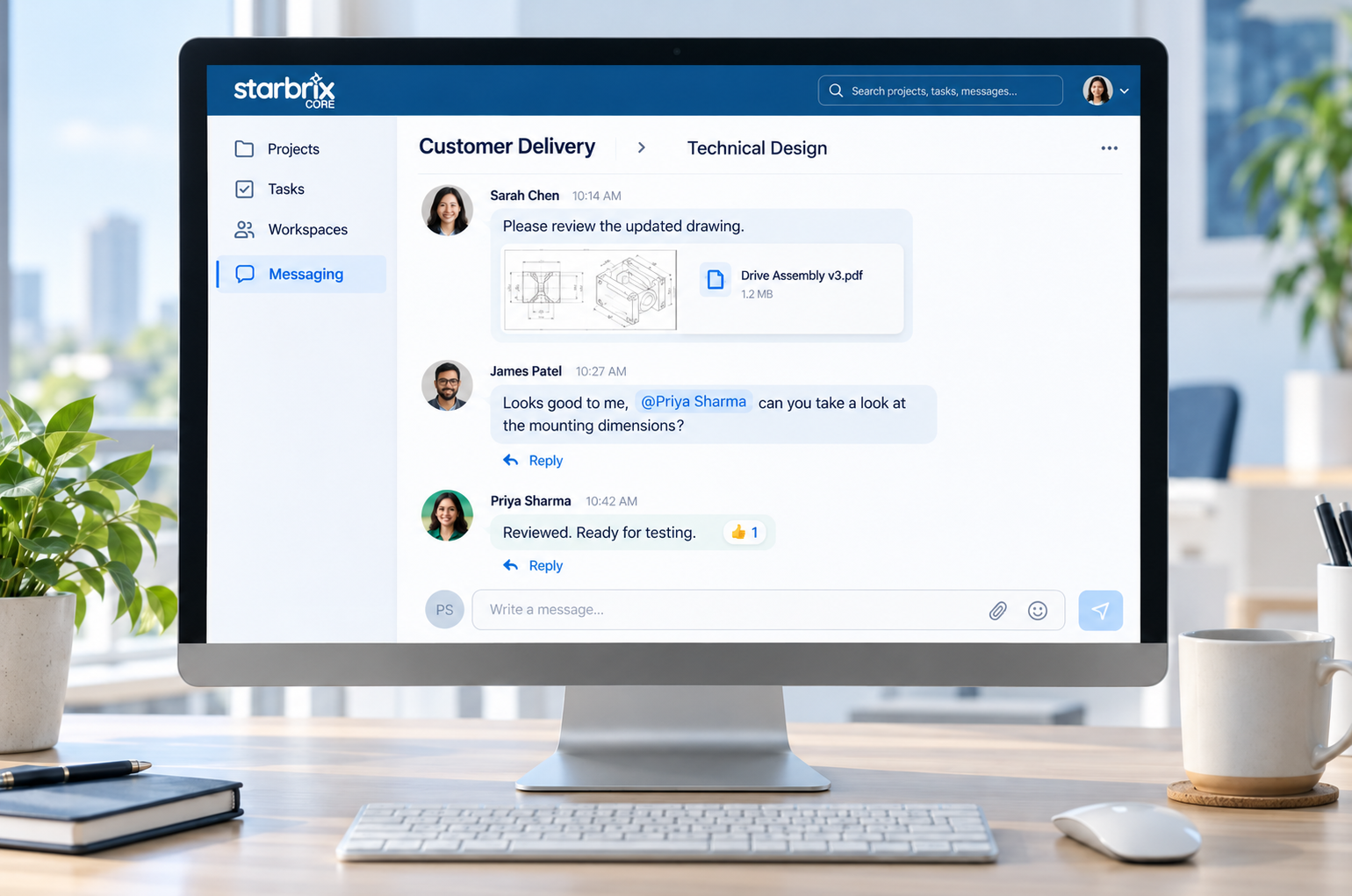
Conversations in context
Projects, tasks, Workspaces, and organization.
Everyday communication
Direct messages and custom groups.
Useful discussion tools
Replies, mentions, sharing, and search.
PROJECT AND TASK CHATS
Keep the question and the answer together.
Discuss project-wide matters in the project chat. Use a task’s own chat for a specific drawing, test result, or activity.
SIMPLIFIED EXAMPLE · TASK CHAT
PROJECT · PRODUCT DEVELOPMENT
Task: Review housing design
REPLY TO ALEX
EmmaI checked them. The mounting holes need to move 5 mm to the left.
👍 1SIX TYPES OF CHAT
Choose the conversation that fits.
Project
Discuss requirements, schedules, and matters concerning the whole delivery.
Task
Keep activity-specific questions and supporting materials with the relevant task.
Workspace
Coordinate a team’s priorities and work across projects.
Organization
Share information relevant to organization members.
Group
Bring selected people together without creating a project.
Direct
Talk with one person when a project or task chat is not needed.
A CENTRAL MESSAGING AREA
Follow your conversations in one place.
Access relevant conversations in Messaging without opening every project or task separately. Project and task chats retain their connection to the underlying work.
SIMPLIFIED EXAMPLE · MESSAGING
Conversations
Task · Product development
Project chat
Workspace chat
Direct message
PRODUCT DEVELOPMENT / REVIEW HOUSING DESIGN
Review housing design
REPLY TO ALEX
EmmaI checked them. The mounting holes need to move 5 mm to the left.
👍 1EVERYDAY MESSAGING TOOLS
Respond, share, and find the background.
Respond clearly
Use replies to connect answers to questions, @mentions to draw attention, and reactions or emojis to acknowledge updates.
Share what matters
Add files, images, videos, and links to explain a question or share supporting material.
Find the background
Search earlier messages and return to relevant conversations in the central Messaging area.
Keep ongoing reference documents directly on the project or task when they need to be easy to find beyond a particular discussion.
Explore Project Document Management →NOTIFICATIONS AND MOBILE USE
Stay connected when you are away.
Notice new messages
In-app notifications draw attention to new communication. Email notifications help recipients notice messages when they are offline.
Chat from your smartphone
Core is fully optimized for smartphones, keeping project conversations and supporting information accessible away from your desk.
Message notifications support conversations. Configured project and task notifications draw attention to events such as a predecessor task being completed.
Explore Notifications & Reminders →Invited customers, consultants, and partners can participate according to relevant memberships and permissions.
Explore User Management & Permissions →PROJECT KNOWLEDGE
Find the discussion behind the decision.
Return to the relevant project or task to find the question, replies, and shared materials. Authorized colleagues can follow the background when work is handed over or an issue needs to be revisited.
When a decision changes the plan, update the task’s current information, dates, or responsibilities as well.
ANSWERS TO COMMON QUESTIONS
Frequently asked questions
What types of chat does Core include?
Core includes project, task, Workspace, and organization chats, as well as group chats and one-to-one direct messages.
Can each task have its own chat?
Yes. Tasks at different levels of the hierarchy can have their own conversations.
Can we create group and direct chats outside projects?
Yes. Use group chats for selected participants and direct messages for one-to-one conversations without creating a project.
Can we share files and use replies and mentions?
Yes. Share files, images, videos, and links. Use replies, @mentions, reactions, and emojis to make conversations easier to follow.
How can I find and follow conversations?
Use the central Messaging area to access relevant conversations and search to find earlier messages. Project and task chats retain their connection to the work.
What happens when I am offline?
Email notifications help you notice new chat messages when you are offline. In-app notifications draw attention to messages while you work in Core.
Can external participants join discussions?
Yes. Invited external users can participate according to relevant memberships and permissions.
Keep the conversation connected to the work.
Discuss, share, and preserve useful project knowledge in the same environment where your team manages delivery.
Start FreeFree forever for teams of up to 3 members.