Consistent processes
Reuse the normal project structure so different teams begin with the same essential activities.

PROJECT TEMPLATES
Standardize your work and start projects faster with reusable tasks, schedules, dependencies, and notifications.
Reuse an established project structure, then choose whether to include its schedule and resources. Adapt the new project to the work ahead.
Start Free →Free forever for teams of up to 3 members.
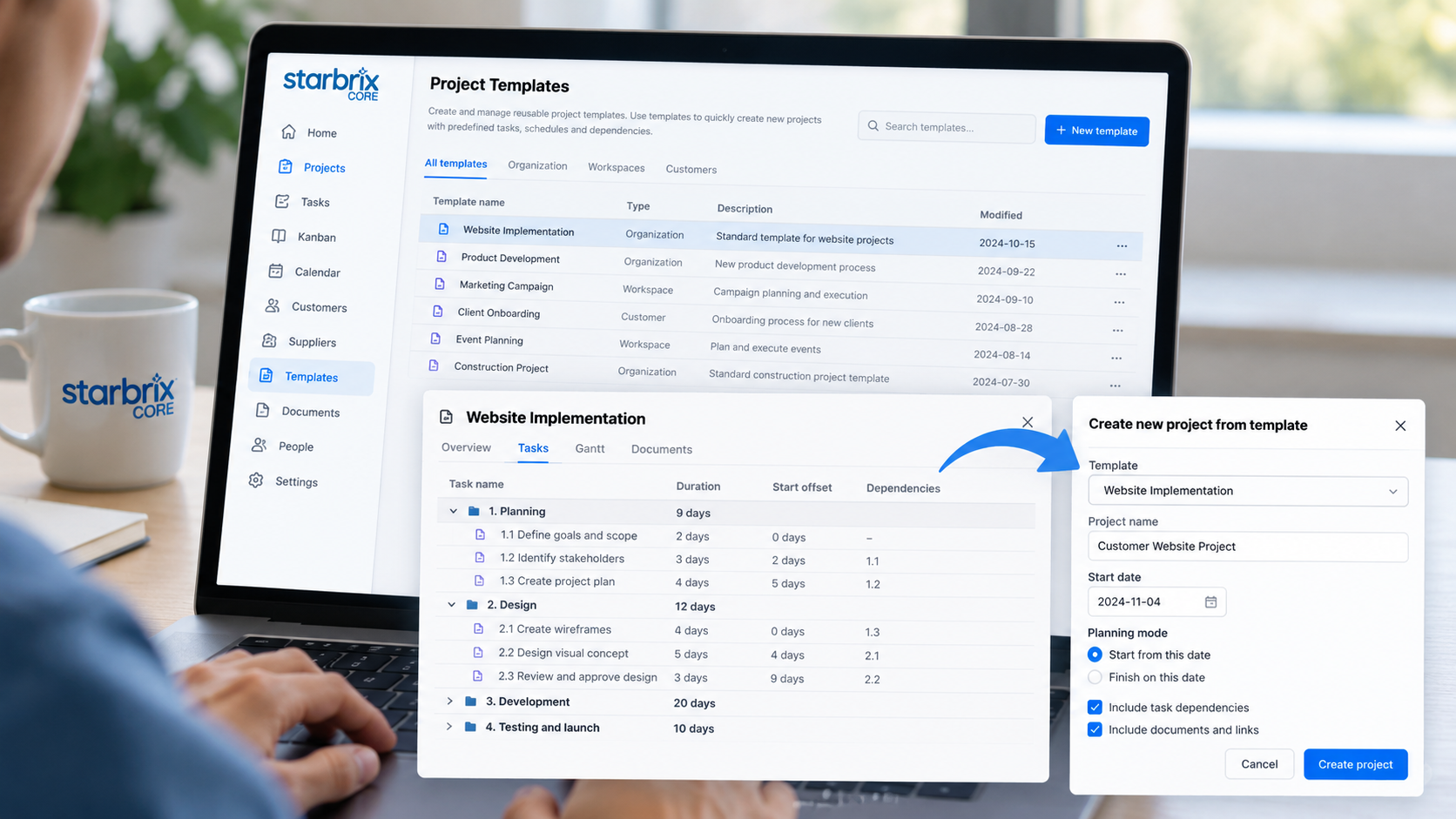
STOP REBUILDING THE SAME PLANS
Customer deliveries, product development, installations, onboarding, and internal initiatives often follow familiar processes. Starting from an empty spreadsheet each time means recreating tasks, assigning responsibilities, and defining scheduling relationships again.
Templates provide a reliable starting point. Reduce repetitive setup, avoid overlooked activities, and make established working methods available to every project manager.
Reuse the normal project structure so different teams begin with the same essential activities.
Include recurring tasks, meetings, and smaller follow-ups from the beginning.
Carry prepared files and links into new projects so instructions and references are available from the start.
BUILD AROUND YOUR ACTUAL PROCESS
Use the same planning capabilities as an ordinary project. Define phases, create tasks and subtasks, and connect their schedules. Improve the template over time by adding overlooked activities and refining dependencies and reminders.
Prepare files and links alongside the activities. Place templates at organization, Workspace, or customer level so the right starting plans are available in the relevant context.
Watch: Create and use project templates →
Explore Task Management →EXAMPLE · CUSTOMER DELIVERY
INCLUDE THE WHOLE PROCESS
Prepare structured project work with responsibilities, schedules, and dependencies.
Include smaller actions and follow-ups, such as confirming supplier availability.
Prepare recurring meetings and reviews, such as a design review or customer handover.
A product development template can combine detailed engineering tasks, a supplier follow-up to-do, and a scheduled review. Both major activities and recurring obligations become part of the starting plan.
REUSE THE LOGIC, ADAPT THE DATES
Preserve normal durations and scheduling relationships without forcing future projects to use the template's original calendar dates.
Connect sequential and parallel activities. Core supports Finish-to-Start, Start-to-Start, Finish-to-Finish, and Start-to-Finish dependencies, including lead and lag.
Use convenient example dates, such as an arbitrary Monday, to prepare the normal timing of tasks and their relationships.
When creating a real project, adapt the plan to its planned start or finish date. Relative timing and task durations are preserved as dates shift.
CHOOSE WHAT TO REUSE
Create the new project with or without the template’s schedule and resources. When including a schedule, anchor it to a planned start or finish date while preserving task durations and relative timing.
Then adjust tasks, responsibilities, dates, and supporting information for the new job. A template is a starting point you can adapt.
STANDARDIZE COMMUNICATION
Prepare custom email notifications for the template project and its tasks, to-dos, and events. These settings can be carried into new projects.
Notify a responsible person at a selected status, inform the next task owner when preceding work finishes, or remind participants about events and to-do deadlines.
Explore Project Notifications & Reminders →YOUR QUESTIONS, ANSWERED
A reusable project structure that can include tasks, subtasks, schedules, dependencies, to-dos, calendar events, files, links, and predefined notification settings.
Yes. Create templates for product development, customer deliveries, installations, internal improvements, and other recurring workflows.
Yes. Templates can preserve scheduling dependencies so the same relationships can be reused in new projects.
Not necessarily. Adapt the schedule to the new project's planned start or finish date while preserving relative timing and task durations.
Yes. Choose whether to include the template’s schedule and resources when creating a project. You can then adjust the new project’s tasks, responsibilities, dates, and supporting information.
Yes. Reuse tasks, to-dos, and calendar events as part of your standard project process.
Yes. Configure custom notifications for the project, tasks, to-dos, and calendar events, then transfer them to projects created from the template.
Use organization-level templates for shared processes, Workspace templates for relevant teams or portfolios, and customer templates for recurring customer work.
Build your templates once. Improve them over time.
Adapt them to each new project's needs.
Free forever for teams of up to 3 members.