
GANTT CHARTS
Gantt charts that connect tasks, dates, and dependencies.
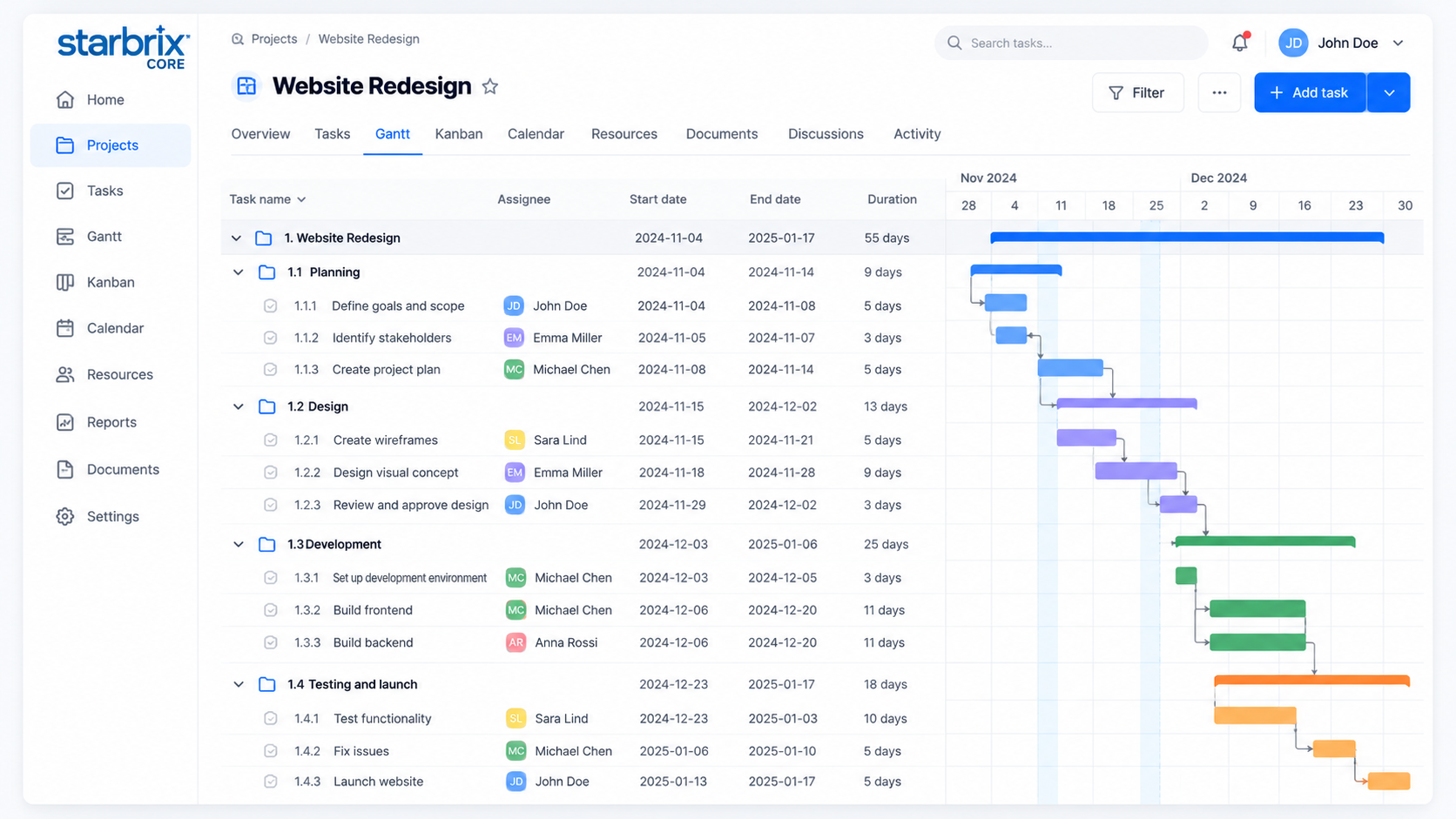
Create tasks directly in Gantt, organize subtasks, and connect activities with dependencies. Adjust dates and durations while keeping your schedule connected to Table, Kanban, and Calendar.
Start FreeFree forever for teams of up to 3 members.
Four dependency types
Model how activities relate.
Unlimited subtask levels
Move from overview to detail.
One saved baseline
Compare the current plan.
BUILD YOUR PROJECT PLAN
Create and schedule tasks directly in Gantt.
Break your project into phases, tasks, and subtasks. Set dates and durations, then adjust the schedule directly in the chart.
Organize the work
Create tasks and nested subtasks. Expand the details when planning individual activities, or collapse them for a clear project overview.
Draw task schedules with your mouse
Click and drag in the Gantt chart to create a task’s time bar. Move or resize the bar to adjust its dates and duration.
TASK DEPENDENCIES
Four ways to connect your activities.
Connect tasks with your mouse
Drag from a task’s start or finish point to another task’s start or finish point to create a dependency. Choose the connection points to define how the tasks depend on each other.
Finish-to-Start (FS)
Installation starts after delivery finishes.
Start-to-Start (SS)
Documentation starts when development starts.
Finish-to-Finish (FF)
Documentation cannot finish before testing finishes.
Start-to-Finish (SF)
The old service stays active until its replacement starts.
These relationships let you represent more than a simple sequential chain. When the schedule changes, review the effects on dependent activities.
LEAD, LAG, AND WORKING TIME
Plan overlaps and waiting periods.
Lead: overlap by two days
Start documentation two working days before development finishes.
Lag: wait two days
Start installation two working days after painting finishes.
Scheduling calendars define working days and non-working periods, including weekends and holidays, so task durations reflect the time available for work.
PROJECT BASELINES
Keep an agreed plan in view.
Save the agreed schedule as a baseline and compare it with current dates. The example below shows the same task moving two days later.
Installation: two working days later
Saved baseline
Current schedule
A baseline can be saved only once per project and cannot be replaced. Save it when the project schedule is agreed, then use it as a fixed reference for comparison.
ANSWERS TO COMMON QUESTIONS
Frequently asked questions
Does Starbrix Core include interactive Gantt charts?
Yes. Create tasks directly in Gantt, set dates and durations, organize subtasks, and manage dependencies.
Can I create multiple levels of subtasks?
Yes. Starbrix Core supports unlimited levels of nested subtasks. Expand or collapse the hierarchy in Gantt to focus on the level of detail you need.
Which task dependency types are supported?
Finish-to-Start, Start-to-Start, Finish-to-Finish, and Start-to-Finish dependencies are supported, including lead and lag times.
Can I account for weekends and holidays?
Yes. Scheduling calendars can account for working days and defined non-working days.
Can I compare the current schedule with the original plan?
Yes. Save a baseline once per project and display it alongside the current schedule. The saved baseline cannot be replaced, so it remains a fixed reference as the schedule changes.
Can I reuse a Gantt schedule?
Yes. Project templates can include tasks, durations, and dependencies. Adapt the copied schedule to a new project's planned start or finish date.
Are Gantt charts connected to Kanban and calendars?
Yes. Gantt charts use the same connected project and task information as the relevant task tables, Kanban boards, and calendars.
Does Starbrix Core include critical path analysis?
No. Critical path analysis is currently available in Starbrix Flex, not Starbrix Core. Core supports task dependencies, lead and lag times, and baseline comparisons.
Take control of your project schedules.
Build realistic plans, coordinate dependent activities, and keep your schedule connected to the people doing the work.
Start FreeFree forever for teams of up to 3 members.