
TIME TRACKING & APPROVALS
Track project time. Review and approve reported hours.
Report time against projects and tasks using hours, start and finish times, or a timer. Review entries and choose the approval process your organization needs.
Start Free60-day free trial. All features included.
Three reporting methods
Hours, start and finish times, or a timer.
Project and task records
Connect time to the work performed.
Optional approvals
Choose the process your team needs.
FROM TIME ENTRY TO APPROVED HOURS
Report the work. Review the records.
Project Time Tracking
Record project or task hours in the weekly grid, reporting window, or approval table. Review daily totals and export time records to Excel.
Explore Project Time Tracking →Timesheet Review & Approval
Check time entries and use the approval stages your organization needs. Assign reviewers and approvers to match responsibilities.
Explore Timesheet Review & Approval →THREE WAYS TO REPORT TIME
Choose the method that fits the work.
Enter hours
Enter the duration worked without specifying exact start and finish times.
Start and finish times
Record when the work started and ended.
Use a timer
Start timing when you begin an activity and stop when you finish.
Report the week in one place.
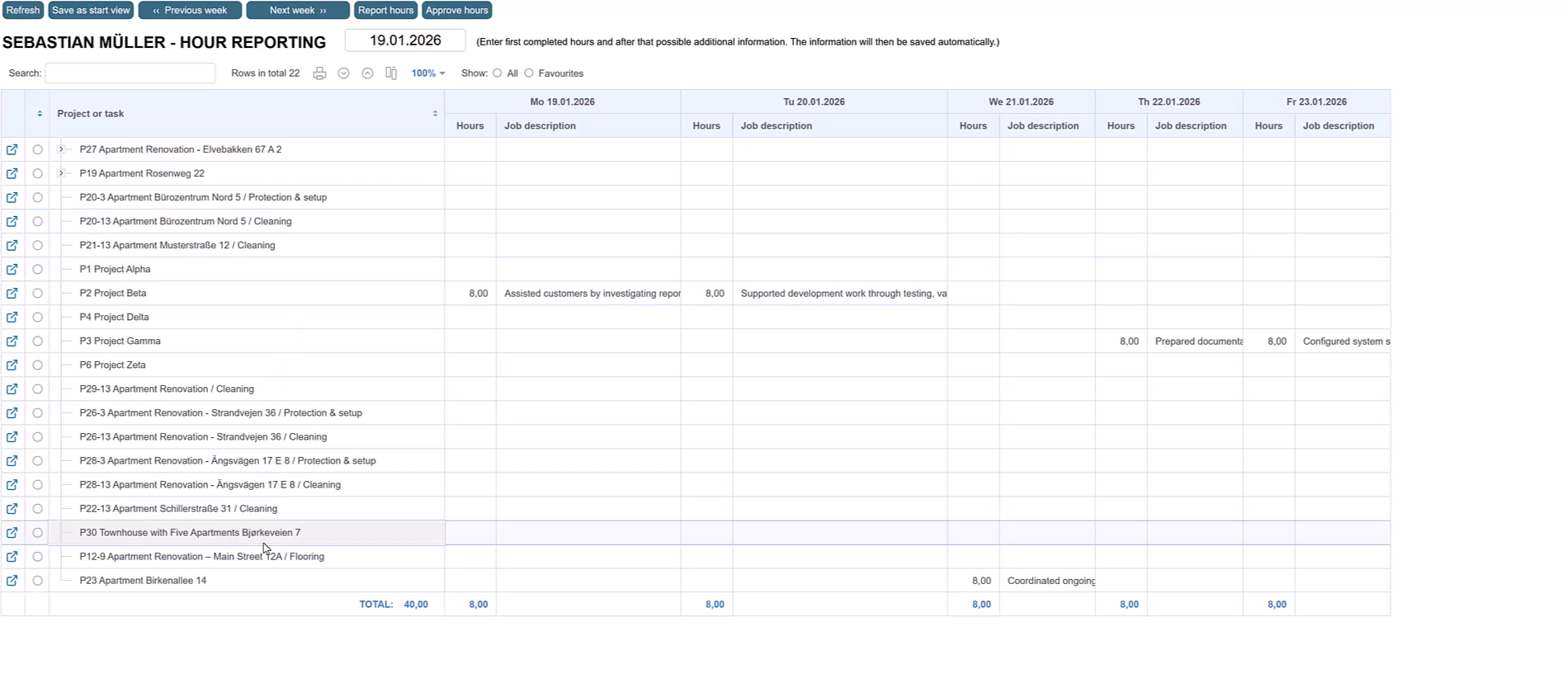
The weekly hour reporting grid automatically lists the projects and tasks you are working on during the selected week. Enter hours and short work descriptions directly in the day columns.
You can also use the reporting window, report directly from a project or task’s Completed hours view, or add entries in the approval table.
Starbrix Flex offers mobile-optimized time reporting, so people can report project and task hours away from their desks.
REVIEW REPORTED TIME
Check the work behind the hours.
Search, filter, sort, and group entries for a project, person, or reporting period, according to your access rights. Descriptions help explain what was done.
| Date | Person | Project / task | Hours | Description |
|---|---|---|---|---|
| Nov 2 | Alex | Customer delivery / Technical drawings | 3.5 | Updated installation drawings |
| Nov 2 | Mia | Customer delivery | 1.5 | Project coordination |
Review individual rows or use the top-row checkbox to approve or unapprove multiple eligible entries. Required earlier stages still apply. Export time records to Excel when needed.
OPTIONAL APPROVALS
Choose the approval process you need.
No formal approval
Employee records timeReview the records through normal working practices. There is no additional formal approval stage.
Single-stage approval
Employee records timeDesignated approver approvesOne management approval stage, without a separate preliminary reviewer.
Review and final approval
Employee records timeReviewer checks entriesApprover gives final approvalTwo management stages: checking the entries, then final authorization.
Required steps cannot be skipped, including when multiple entries are approved together.
Explore Timesheet Review & Approval →PLANNED AND ACTUAL HOURS
See where the time goes.
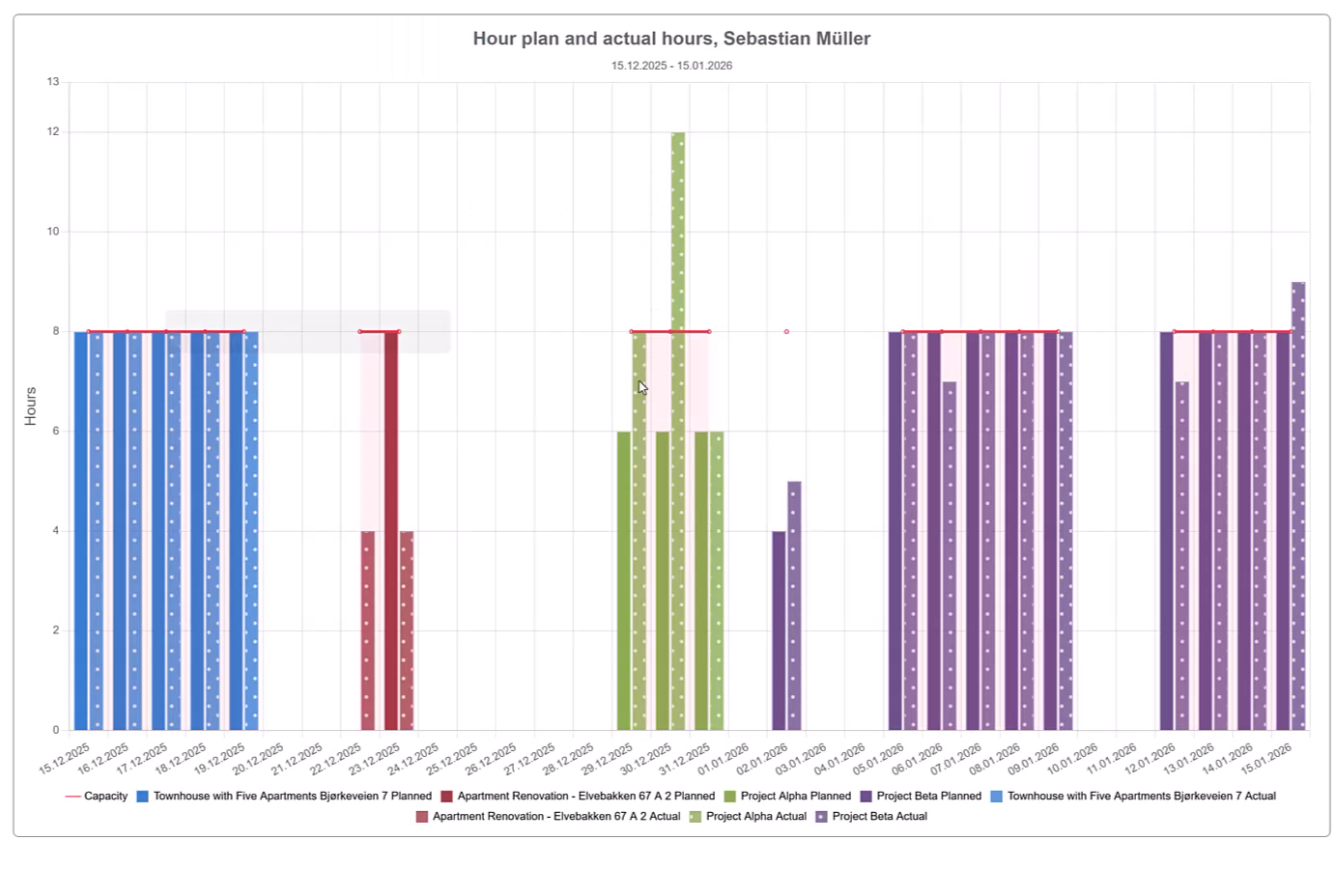
Compare planned and actual hours for one employee, several people, or the entire organization. Show the figures together or in separate charts, and use the results to improve estimates and project follow-up.
Create flexible list-based reports for customer reporting and invoice attachments. Print them, save as PDF, or export to Excel.
Explore Project Progress & Dashboards →HOUR STATEMENTS
Document the work. Support your funding claim.
For externally funded projects, payment of awarded funding may depend on documenting the hours worked. An Hour Statement records a person’s project hours and work performed in the format the financier requires. Starbrix Flex creates it from time already reported, helping you provide the evidence needed to request payment.
Explore Hour Statements →TIME REPORTS
See where the reported hours went.
Create detailed time reports or compare projects and people in a matrix. Choose the period, records, columns, and grouping you need, include planned hours, and print or export the result.
Explore Time Reports →ANSWERS TO COMMON QUESTIONS
Frequently asked questions
Can employees track time directly in Starbrix Flex?
Yes. Enter the number of hours worked, record start and finish times, or use a timer. Time reporting is also available on mobile.
Can time be reported for individual project tasks?
Yes. Connect a time entry to a project as a whole or to a specific task within it.
Is there a weekly time reporting view?
Yes. The weekly grid lists the projects and tasks you are working on during the selected week. Enter hours and work descriptions directly in the day columns.
Can we use time tracking without formal approvals?
Yes. Use time tracking on its own or configure the review and approval stages your organization needs.
How does the approval process work?
Employees check their entries and mark them Ready for approval. The assigned checker is notified by email. After checking, the information moves on to the final approver. The intermediate checker can be omitted.
Can I compare planned and actual hours?
Yes. Review planned and actual hours for one employee, several people, or the whole organization. Display them together or in separate charts.
Can we export or print time reports?
Yes. Print reports, save them as PDF, or export to Excel. List-based reports can also be used as invoice attachments.
Make time tracking easier for everyone.
Connect flexible time entry, useful project records, and approvals that match your organization.
Start Free60-day free trial. All features included.
