
TIMESHEET REVIEW & APPROVAL
Review reported time. Approve it in the right order.
Choose whether reported hours need approval, assign reviewers and approvers, and process entries individually or together.
Start Free60-day free trial. All features included.
Optional workflows
No approval, approval, or review and approval.
Individual responsibilities
Assign reviewers and final approvers.
Efficient controls
Process eligible rows individually or together.
CHOOSE YOUR WORKFLOW
Use the approval process your team needs.
Formal approval is optional. Choose a single approval stage or add a separate review before final approval.
No formal approval
Keep time records without an additional approval stage.
Approval
A designated approver checks and approves reported hours.
Review and approval
A reviewer checks the entries before the final approver authorizes them.
An employee check can come first
Where configured, employees must approve their own time reports before the review or approval stages can proceed. This reporting step is separate from permission to act as their own final approver.
SEE THE REQUIRED ORDER
Every entry follows the same steps.
In this example, the workflow requires employee confirmation, review, and final approval. A later step waits until the earlier required steps are complete.
EXAMPLE · THREE TIME ENTRIES · REVIEW AND FINAL APPROVAL
| Project / task | Hours | Employee confirmation | Review | Final approval |
|---|---|---|---|---|
| Customer delivery / Drawings | 3.5 | Confirmed | Reviewed | Approved |
| Product development / Testing | 2 | Confirmed | Ready for review | Waiting for review |
| Website update / Help content | 1.5 | Not confirmed | Waiting for employee | Waiting for earlier steps |
Employee
Checks their project, task, date, hours, and description, then confirms the report where required.
Reviewer
Checks the reported work and completes the review for entries that are ready.
Final approver
Gives final approval after all required earlier steps are complete.
CLEAR RESPONSIBILITIES
Keep the approval process moving.
After checking their time entries, employees mark them Ready for approval. Starbrix Flex automatically notifies the assigned checker by email. Once checking is complete, the information moves on to the final approver.
Employee
Review the reported hours, correct entries where needed, and submit them for approval.
Checker
Check the work descriptions and reported hours before completing the review.
Final approver
Give final approval after the required review is complete. The intermediate checker can be omitted when your process does not need it.
CHECK THE WORK BEHIND THE HOURS
Review and edit in the same table.
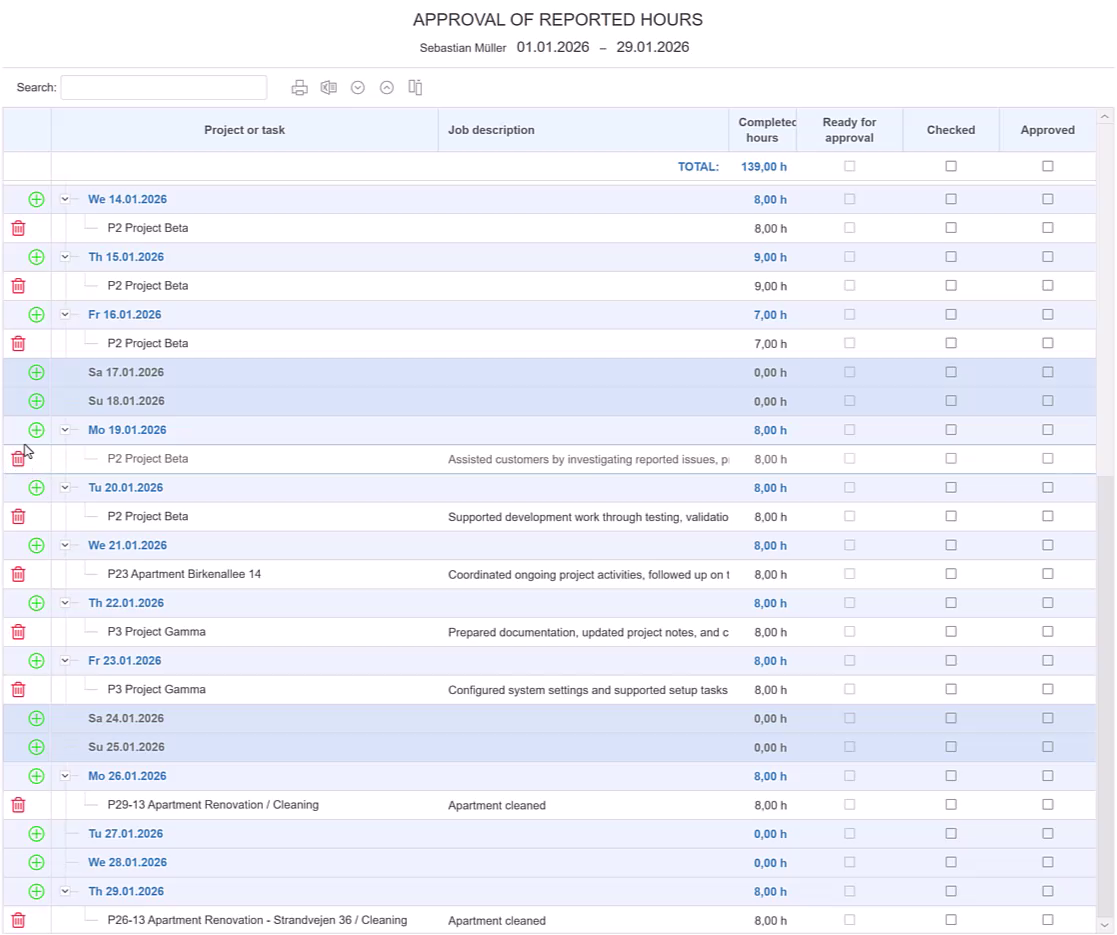
Employees can review, edit, add, or remove time entries directly in the approval table. It can also serve as their main time reporting view, bringing reporting and review into the same place.
Check the project or task, date, number of hours, and work description before submitting the entries. Follow the Ready for approval, Checked, and Approved columns to see where each entry stands.
INDIVIDUAL AND BULK APPROVAL
Approve several entries. Keep every required step.
After reviewing the records, use the top-row checkbox to approve or unapprove multiple eligible entries. Use a row’s own checkbox when you need to handle an entry separately.
Entries that still need an earlier required approval remain unapproved. Bulk approval follows the same rules as individual approval.
HOUR STATEMENTS
Document the work. Support your funding claim.
For externally funded projects, payment of awarded funding may depend on documenting the hours worked. An Hour Statement records a person’s project hours and work performed in the format the financier requires. Starbrix Flex creates it from time already reported, helping you provide the evidence needed to request payment.
Explore Hour Statements →TIME REPORTS
See where the reported hours went.
Create detailed time reports or compare projects and people in a matrix. Choose the period, records, columns, and grouping you need, include planned hours, and print or export the result.
Explore Time Reports →ANSWERS TO COMMON QUESTIONS
Frequently asked questions
Do we have to use a separate checker?
No. Starbrix Flex can be configured to send time reports for approval without an intermediate checker.
What is the difference between checking and approval?
Checking reviews the reported time entries. Final approval authorizes the hours after the required earlier steps are complete.
Can employees correct their time entries before submission?
Yes. Employees can review, edit, add, or remove time entries directly in the approval table before marking them Ready for approval.
How does the checker know time is ready?
When employees submit their checked time reports, Starbrix Flex automatically notifies the assigned checker by email. After checking, the information moves on to the final approver.
Can I approve several entries at once?
Yes. Use an individual row’s checkbox or the top-row controls to process multiple eligible entries. The configured order of approval still applies.
What do the approval columns show?
The table shows Ready for approval, Checked, and Approved, allowing you to follow each entry through the process.
Can I use the time approval sheet as my main time reporting view?
Yes. The time approval sheet can be a convenient way to report time and keep an overview of your hours. Display all days in a week, two weeks, or a full month at once. Add hours to any project or task at any time, review and edit your entries in the same view, and submit them for approval when ready.
Make timesheet approval clear and reliable.
Choose your workflow, assign responsibilities, and keep approved hours connected to the work performed.
Start Free60-day free trial. All features included.
