
SKILLS & COMPETENCES
Find people with the skills your project needs.
Define your team’s competences, specify what each task requires, and choose how Flex suggests matching people: by competence alone, task availability, or available hour capacity.
Start Free60-day free trial. All features included.
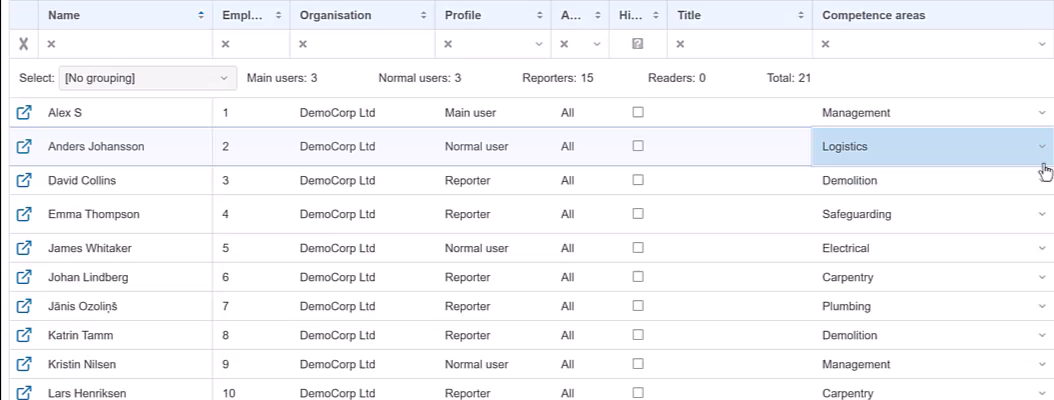
1 · DEFINE YOUR COMPETENCES
Use a shared set of skills across projects.
Define the selectable competences centrally, using the terms that fit your work. The same competence areas connect people’s capabilities with task requirements. Examples might include Electrical, Carpentry, Installation, or Project management.
2 · RECORD PEOPLE’S SKILLS
Make the team’s competences easy to find.
In the All Users view, enter and review each person’s competence areas directly in the table. A person can have several competences and be suitable for more than one type of work.
3 · SPECIFY TASK REQUIREMENTS
Tell Flex what the task needs.
Select the required competence in the task plan. Flex suggests matching people according to your configured rule. Depending on the rule, it also checks bookings during the planned dates or the hours available to complete the work.
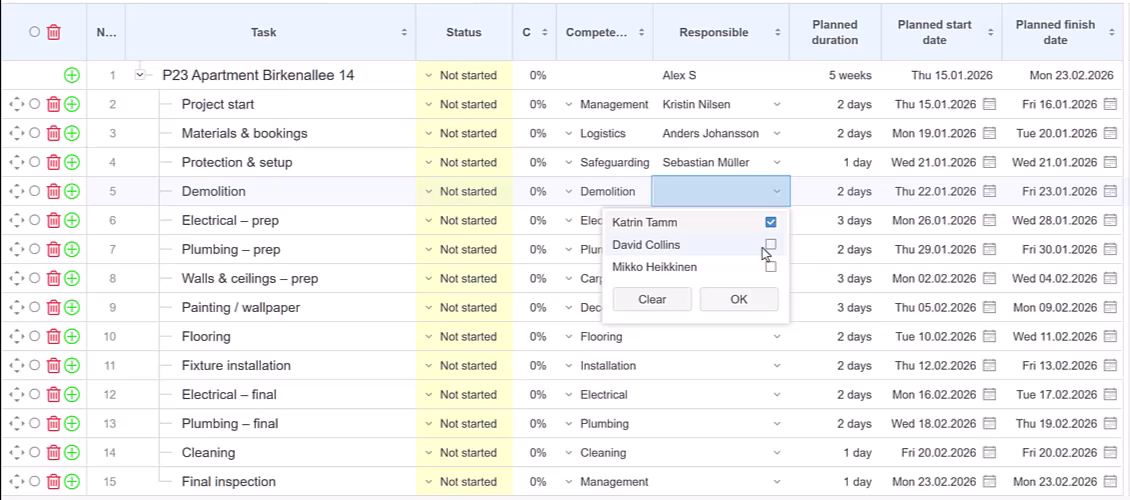
CHOOSE YOUR SUGGESTION RULE
Decide how competence and availability are combined.
Choose how competent resources should be suggested in the Gantt chart. All four rules require the right competence; they differ in how other assignments and available capacity are considered.
All competent resources
Suggest everyone with the required competence, including people already assigned to other tasks.
Available throughout the whole task
Suggest competent people who are not booked on other tasks during the full planned period.
Allow same-day handovers
Use the whole-task availability rule, but allow another task to finish on this task’s start day or begin on its finish day.
Available according to hour planning
Show all people with the required competence, with their available hours for the planned period in parentheses beside each name. Compare the hours and select one person or combine the capacity of several people.
Find 30 available hours between Monday and Friday.
An installation task requires Electrical competence and 30 planned work hours from Monday to Friday. Flex lists all people with that competence and shows their available hours in parentheses. A person with 24 available hours remains in the list: their capacity is not enough for the task alone, but you can select them together with another competent person so the combined capacity covers the work.
| Resource selector | Competence | Capacity for a 30-hour task |
|---|---|---|
| Emma Brooks (32h) | Electrical, Installation | Enough capacity on her own |
| Daniel Reed (24h) | Electrical | Listed — can contribute part of the required capacity |
| Noah Ellis (16h) | Electrical | Listed — Daniel and Noah have 40 available hours combined |
Fictitious example data. Available hours are shown for the task’s planned period.
Explore Hour Planning →FOCUS THE WORKLOAD VIEW
Review the skill group you need.
Filter the person-based workload view by competence to review assignments for the people relevant to the work. See when that group is occupied and where there are gaps, then continue with resource allocation for the assignment details.
Explore Resource Allocation & Workload →FROM SKILLS TO A WORKABLE PLAN
Check commitments and available capacity.
Use these connected tools when choosing between people with the right competence.
Resource Allocation & Workload
Review assignments across projects and resolve conflicts when a person’s commitments overlap.
Explore Resource Allocation & Workload →Capacity Planning
Define available daily hours and account for working days, holidays, and personal time away.
Explore Capacity Planning →ANSWERS TO COMMON QUESTIONS
Frequently asked questions
Where are competences defined?
Selectable skills and competence areas are defined centrally and used across projects.
Where do I record a person’s competences?
Record and review competences directly in the All Users table.
Can a person have more than one competence?
Yes. A person can have several competence areas, so their skills can match different kinds of tasks.
How do I specify the skill a task needs?
Select the required competence in the task plan. The configured rule determines whether Flex lists all competent people, filters them by task availability, or shows all competent people with their available hours in parentheses.
Does matching competence mean a person is available?
Not necessarily. Some rules filter by task bookings. The hour-planning option lists all competent people and shows their available hours, so you can compare them and combine several people’s capacity.
Can I filter the workload view by competence?
Yes. Filter the person-based workload view by competence to focus on the relevant skill group.
Put your team’s skills to work.
Connect task requirements with the people who can meet them in Starbrix Flex.
Start Free60-day free trial. All features included.
