
RESOURCES & WORKLOAD MANAGEMENT
Assign the right people. Plan a workload they can deliver.
Find people with the required skills and available capacity. Plan project hours, spot conflicting assignments, and balance work across projects.
Start Free60-day free trial. All features included.
FOUR CONNECTED PLANNING TOOLS
From the skills you need to the people you assign.
Choose the part of resource planning you want to explore.
Skills & Competences
Who has the right skills for the task? Define competences, record people’s capabilities, and specify what the work requires.
Explore Skills & Competences →Capacity Planning
How many hours does each person have available? Set daily capacity and account for working days, holidays, and time away.
Explore Capacity Planning →Hour Planning
How much work needs to fit into the schedule? Estimate project and task hours, then plan them against available capacity.
Explore Hour Planning →Resource Allocation & Workload
Who should do the work, and does it conflict with other projects? Choose available people and review their assignments together.
Explore Resource Allocation & Workload →WHEN PLANS CHANGE
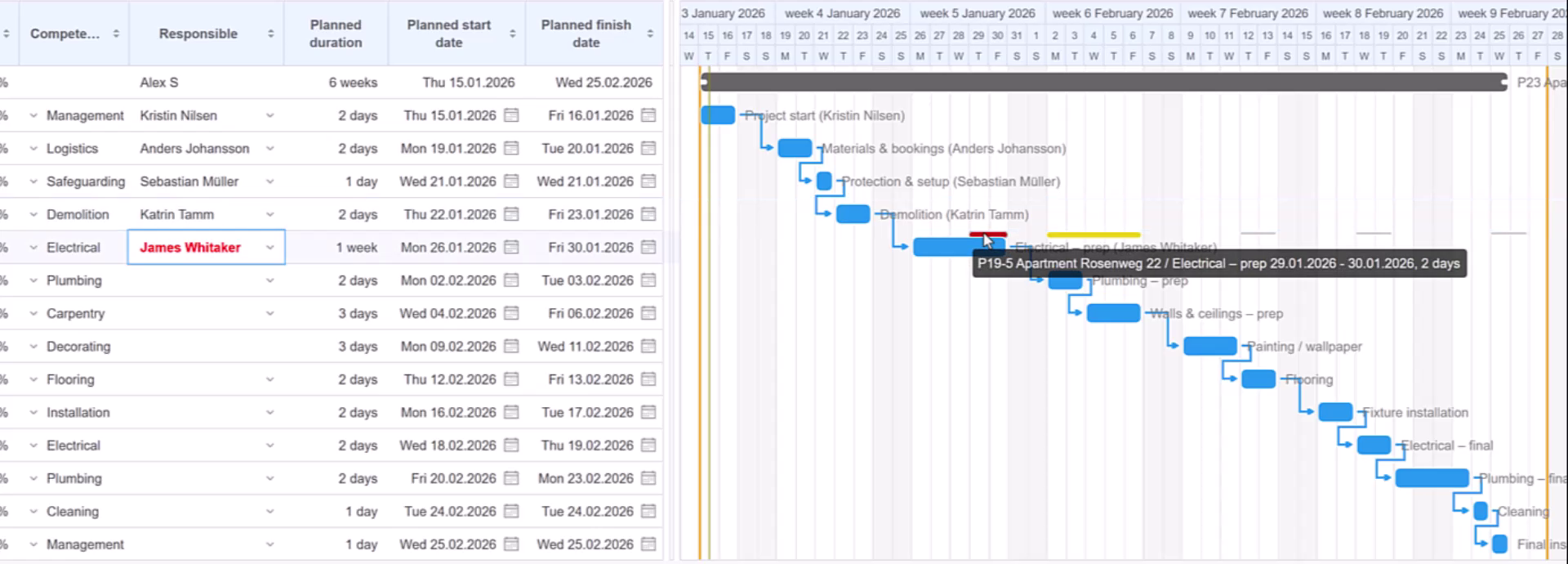
An extra two days can change who is available.
A task is extended by two days. The assigned person is already committed to work in another project, so Flex highlights the conflict. Review the overlapping commitment and choose another person with the required competence who is available for the full period.
BUSY PERIODS AND AVAILABLE TIME
Find room for new work as well as overloads.
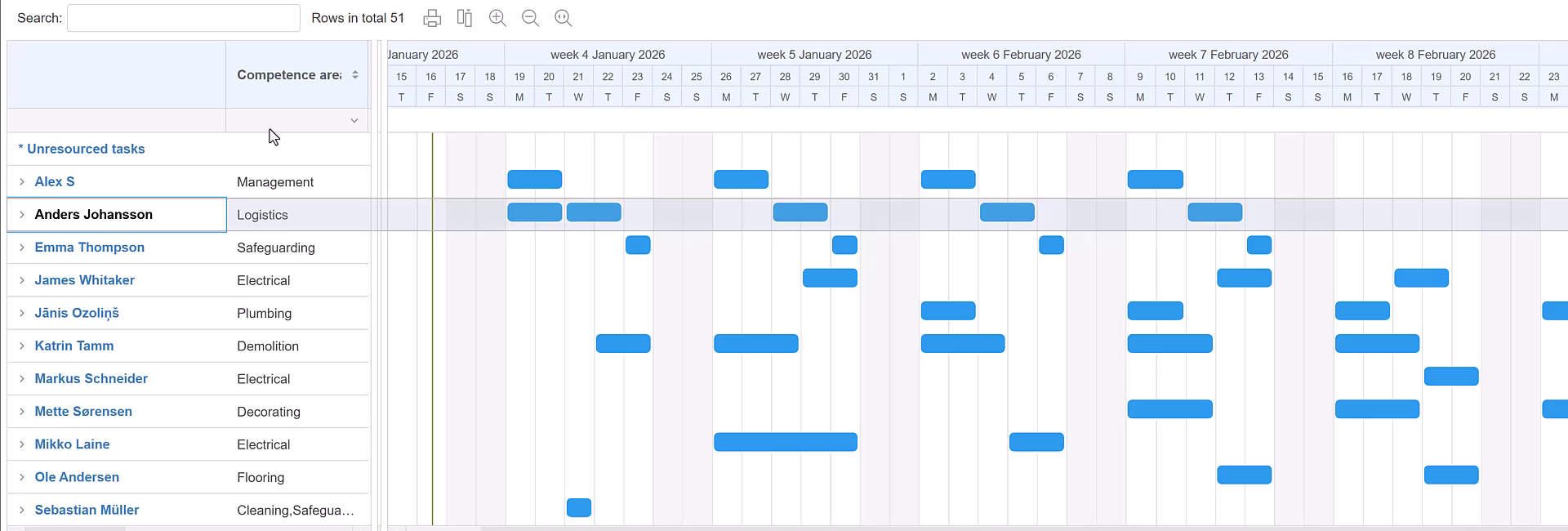
In the Tasks by person view, each person appears on one timeline row. Blue bars show task assignments, helping you see busy periods and gaps across projects. Filter by competence to focus on the people a new task needs.
Review assignments on the timeline
See when people are booked and where there may be room for another assignment. Use the resource overload filter to focus on conflicts.
Check the hours behind the dates
A task bar shows an assignment over time. Use Hour Planning to compare planned work in hours with the person’s available capacity.
Explore Hour Planning →CONNECTED TO YOUR PROJECT PLAN
Put resource decisions into practice.
Use the schedule and reusable project structures to carry resource planning into everyday delivery.
Gantt Charts
Review assignments alongside task dates and dependencies, and adjust the plan when commitments conflict.
Explore Gantt Charts →Project Templates
Reuse a prepared task structure, schedules, and resources, then review the people and dates for the new project.
Explore Project Templates →ANSWERS TO COMMON QUESTIONS
Frequently asked questions
Can Flex suggest people with the right skills?
Yes. When a task has a required competence and planned dates, Flex suggests people with matching skills who are available during that period.
Does resource planning consider other projects?
Yes. Review commitments across projects when assigning people, and use the resource overload filter to identify conflicts.
How is capacity different from planned workload?
Capacity describes the hours a person has available. Planned workload describes the hours assigned to the work.
Can I plan around holidays and time away?
Yes. Use working-day settings, common holidays, personal capacity periods, and calendar notes marked to reduce daily hour capacity.
Can planned hours determine a task’s schedule?
Yes. Flex can calculate the schedule from planned work hours and available resource capacity. You can also distribute planned hours within fixed dates.
What does the person-based timeline tell me?
Blue bars show when people are assigned to tasks. Use the view to review commitments and gaps; use Hour Planning to assess work in hours against available capacity.
Build a resource plan your team can deliver.
Match skills, plan hours, and coordinate people across projects in Starbrix Flex.
Start Free60-day free trial. All features included.
