PROJECT PORTFOLIOS & WORKSPACES
See all your projects. Focus each team’s work.
Review projects across your organization, bring each team’s work together in optional Workspaces, and follow progress with shared dashboards.
Start FreeFree forever for teams of up to 3 members.
Your projects at a glance
Organization-wide visibility
Your project portfolio from the start.
Optional Workspaces
Group the work that matters to each team.
Connected progress
Follow projects and portfolio dashboards.
PROJECT PORTFOLIO MANAGEMENT
See all your projects in one overview.
Projects appear in your organization-wide overview as they are created. Search, sort, filter, and group projects to focus on the work you want to review.
Compare project managers, status, completion, and planned dates. Open a project when you need the details. The overview uses the same information your teams maintain in their projects.
Explore Project Portfolio Management →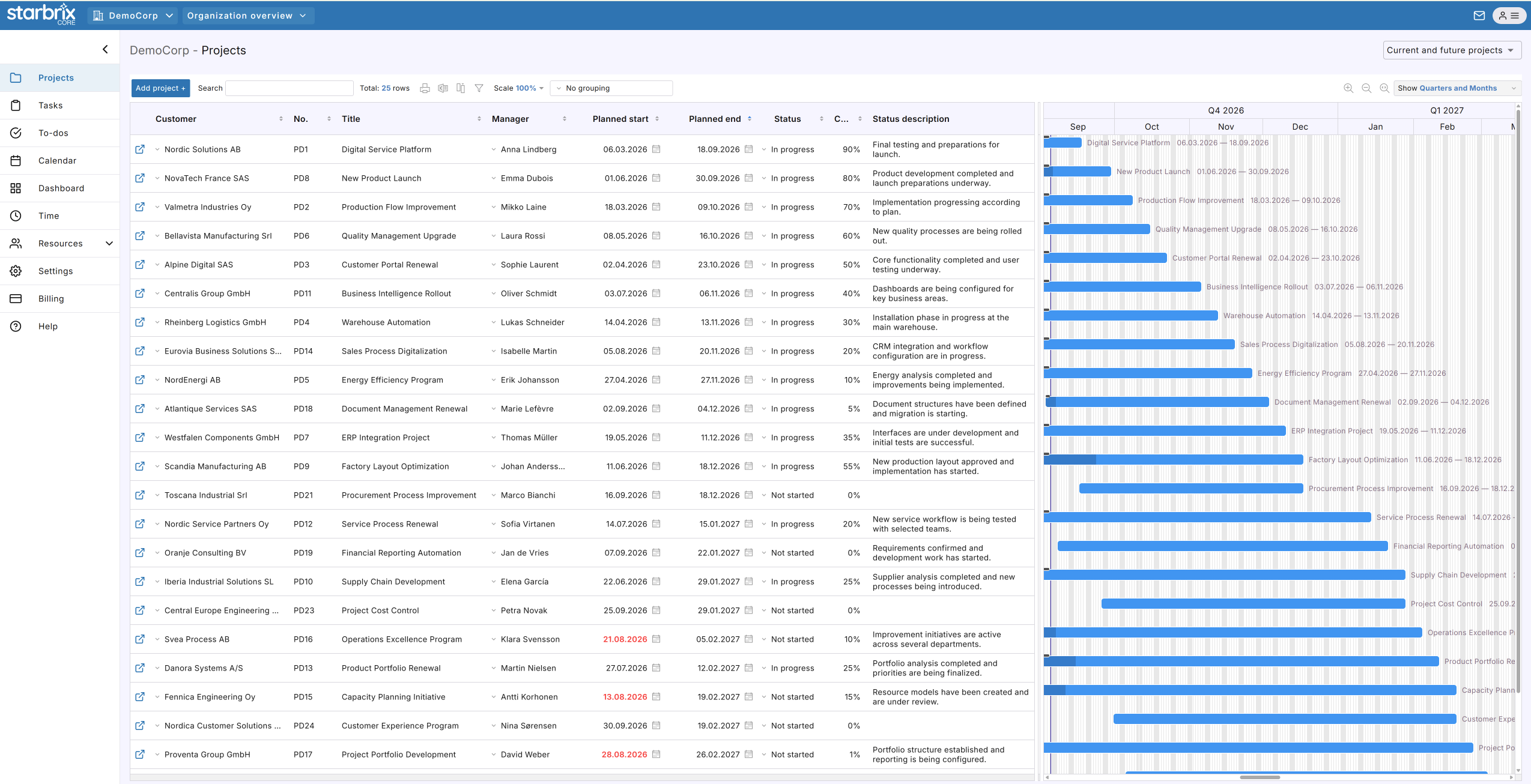
OPTIONAL WORKSPACES
Bring your team’s work together across projects.
Select a Workspace on a project or activity to show it in that team’s view. A team can follow work from several projects together. Workspaces are optional; your organization-wide portfolio is available from the start.
Three projects. One task in each. One shared Workspace.
PROJECT 1
Customer delivery
PROJECT 2
Product development
PROJECT 3
Website update
↓ All three tasks appear in the selected Workspace
Documentation team Workspace
Use Workspace Kanban to organize associated tasks and to-dos, and the Workspace calendar to see scheduled activities.
Explore Workspaces →PROJECT PROGRESS AND DASHBOARDS
See which projects need attention.
Read project status, completion, the project manager’s State assessment, and dates together. Project summaries and portfolio dashboards help you decide where to follow up.
Customer delivery
Most work is complete, but a supplier delay could affect delivery. Follow up with the project manager before the deadline.
Starbrix Core is fully optimized for smartphones, so people can keep project information up to date wherever they work.
Explore Project Progress & Dashboards →ANSWERS TO COMMON QUESTIONS
Frequently asked questions
Does Starbrix Core include project portfolio management?
Yes. Every organization has a project overview by default. Projects can be followed across the organization, subject to user access permissions.
Do we need Workspaces to see all our projects?
No. The organization-wide portfolio is available from the start. Workspaces are optional additional perspectives on selected projects and activities.
Can we create Workspaces for departments, teams, or customers?
Yes. Workspaces can represent departments, teams, customers, project categories, or other relevant areas.
Can a task have a different Workspace association from its project?
Yes. Workspace associations are independent for projects, tasks, to-dos, and calendar events.
Can management monitor progress across projects?
Yes. Project information and organization-wide dashboards support follow-up of completion, status, overall project state, and schedule-related progress.
Can project statuses be customized?
Yes. Project status options can be customized by project type to reflect different workflows.
Do updates in a Workspace also update the original task?
Yes. A Workspace shows the same task as its original project. Changes to the task are reflected wherever that task appears.
Is Starbrix Core free to use?
Yes. Starbrix Core is free forever for teams of up to three members.
Bring your projects into one shared overview.
See the whole portfolio, focus each team’s work, and follow progress in Starbrix Core.
Start FreeFree forever for teams of up to 3 members.