PROJECT PORTFOLIO MANAGEMENT
See every project. Know where to follow up.
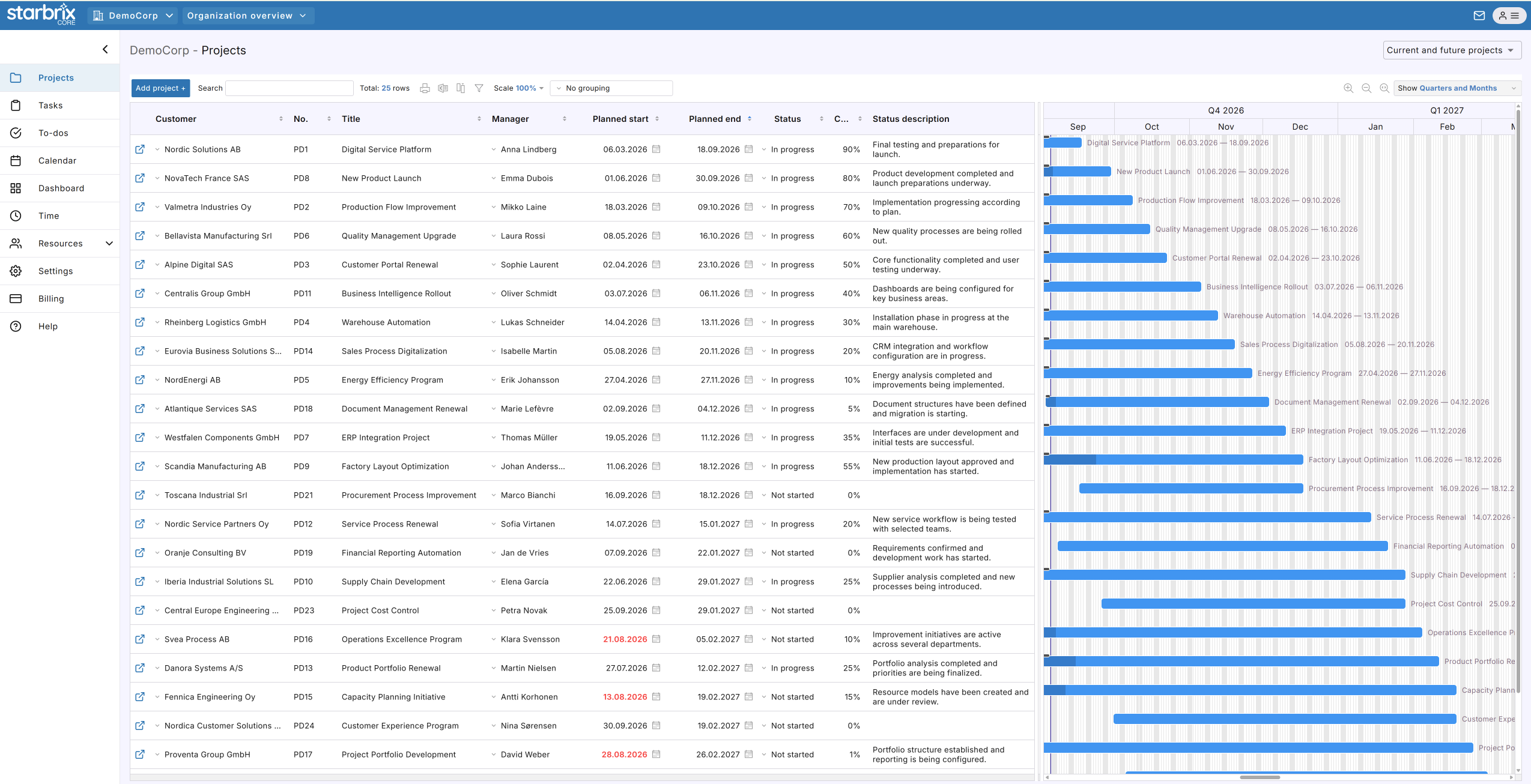
Review project managers, status, completion, and dates in one shared portfolio. Find the projects that need attention and open them for details.
Start FreeFree forever for teams of up to 3 members.
Which project needs a closer look?
Available by default
No separate portfolio setup.
Meaningful progress
Review status, completion, state, and dates.
Less duplicate reporting
Use project information directly.
YOUR ORGANIZATION-WIDE OVERVIEW
Find the projects you need to review.
Projects appear in the shared overview as they are created. You can start reviewing the portfolio straight away. User permissions determine which projects each person can see.
Find a project
Search the overview and open a project to see its tasks, schedule, and supporting information.
Focus the overview
Sort, group, and filter projects to focus on the information you want to review.
Compare projects
Review project managers, status, completion, and planned dates side by side.
The project list brings responsibilities and progress together with project timelines.
FROM OVERVIEW TO FOLLOW-UP
A high completion percentage can still need attention.
Status shows the workflow stage. Completion shows how much work is done. State is a person’s overall assessment, shown with one of three smileys. Read these alongside planned and actual dates.
Example: three projects in your portfolio
Customer delivery
Product development
Website update
Most work is complete, but the project manager’s assessment flags a concern. Open the project, review the remaining installation work, and discuss whether a supplier delay could affect the planned finish.
Use project summaries and portfolio dashboards for further progress information.
Explore Project Progress & Dashboards →KEEP THE OVERVIEW USEFUL
Three steps to current project information.
Bring your projects together
Include the projects you want to follow, so your overview reflects the work taking place across the organization.
Agree on what to update
Decide how project managers will maintain status, completion, dates, and State assessments.
Review the portfolio together
Use Starbrix during project meetings. Open projects for details and update information directly in the project.
Starbrix Core is fully optimized for smartphones, so people can keep project information current while away from their desks.
OPTIONAL WORKSPACES
Give teams a focused view.
Workspaces bring selected projects and activities together for a team or department. The organization-wide portfolio remains available from the start.
Explore Workspaces →ANSWERS TO COMMON QUESTIONS
Frequently asked questions
What is project portfolio management software?
It helps organizations oversee multiple projects, monitor progress, identify problems, and support management decisions. Starbrix Core connects portfolio visibility with everyday project management.
Does Starbrix Core provide an overview of all projects?
Yes. The organization-wide project overview is available by default. Project visibility remains subject to user access permissions.
Can I search, sort, and filter the portfolio?
Yes. Search the project overview, sort and group project information, and use filters to focus on the projects you want to review.
What do the project State smileys mean?
State is a manual assessment of the project’s overall condition, shown with a happy, neutral, or sad smiley. Review it together with status, completion, and dates.
Can different project types have different statuses?
Yes. Customize project statuses by project type to reflect the workflow used for each kind of project.
How do Workspaces differ from the organization-wide portfolio?
The organization-wide portfolio provides the complete project overview. Optional Workspaces provide focused perspectives on selected projects and activities.
Can we stop maintaining separate portfolio spreadsheets?
Yes. When project managers maintain current project information in Starbrix Core, management can use it directly for portfolio reviews. Move missing information into the shared system and retire duplicate reporting.
Can small organizations benefit from portfolio management?
Yes. A shared overview and consistent reporting are useful even with relatively few projects. Starbrix Core does not require complex governance structures.
Start reviewing your projects in one place.
Bring your projects together and use the same information for everyday project work and portfolio reviews.
Start FreeFree forever for teams of up to 3 members.