
CALENDARS
Project calendars for work and everyday plans.
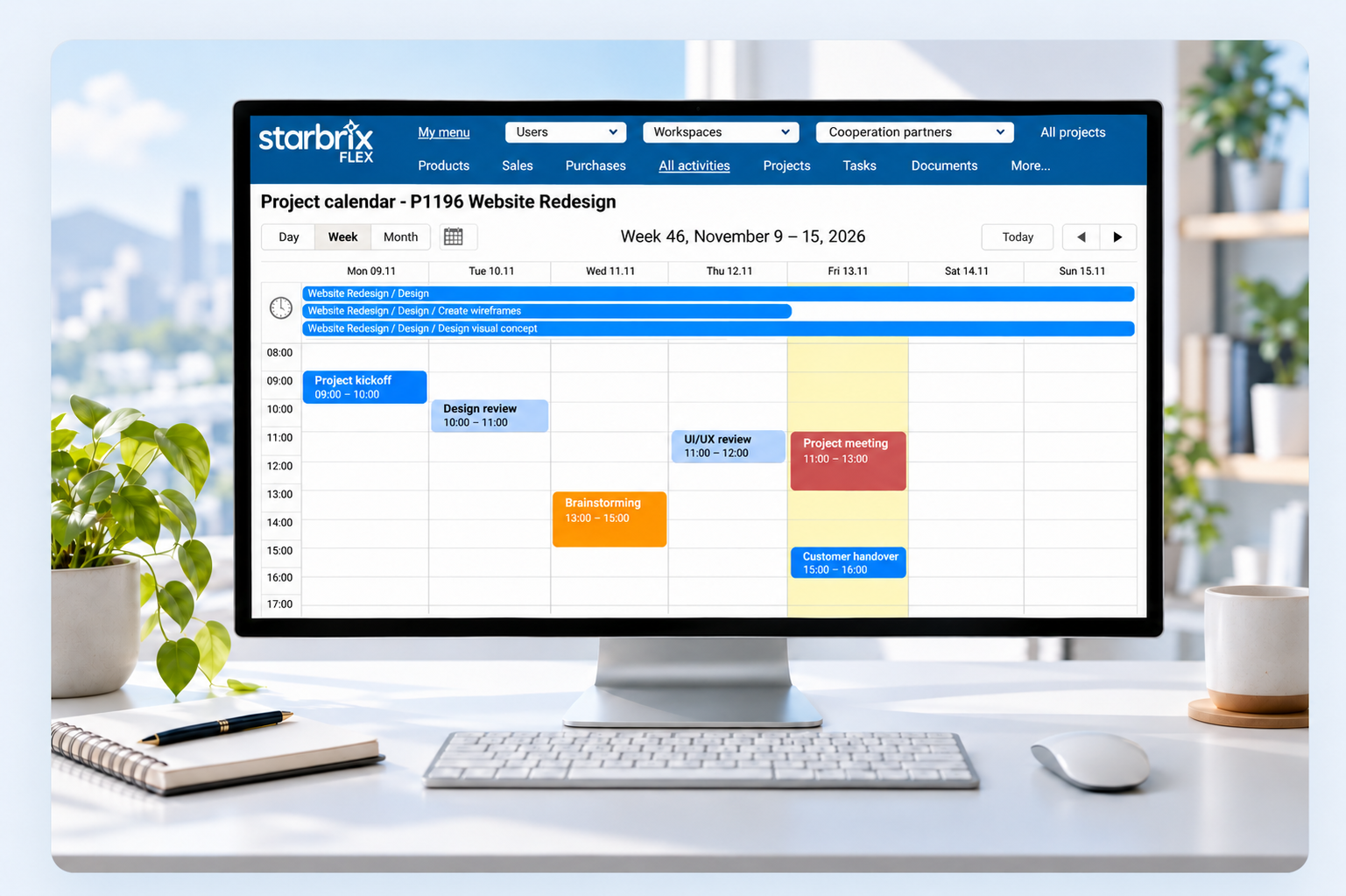
See project tasks alongside calendar notes for everyday work and meetings. Plan when to do things with connected day, week, and month views.
Start Free60-day free trial. All features included.
Create directly
Add calendar notes for things to do.
Day, week, or month
Choose the right planning horizon.
Across projects
See your relevant commitments.
CALENDAR NOTES FOR EVERYDAY WORK
Make time for the things you need to do.
Set aside time to prepare for a meeting, follow up on a discussion, or make an important call. Calendar notes help you remember the small things and decide when to do them.
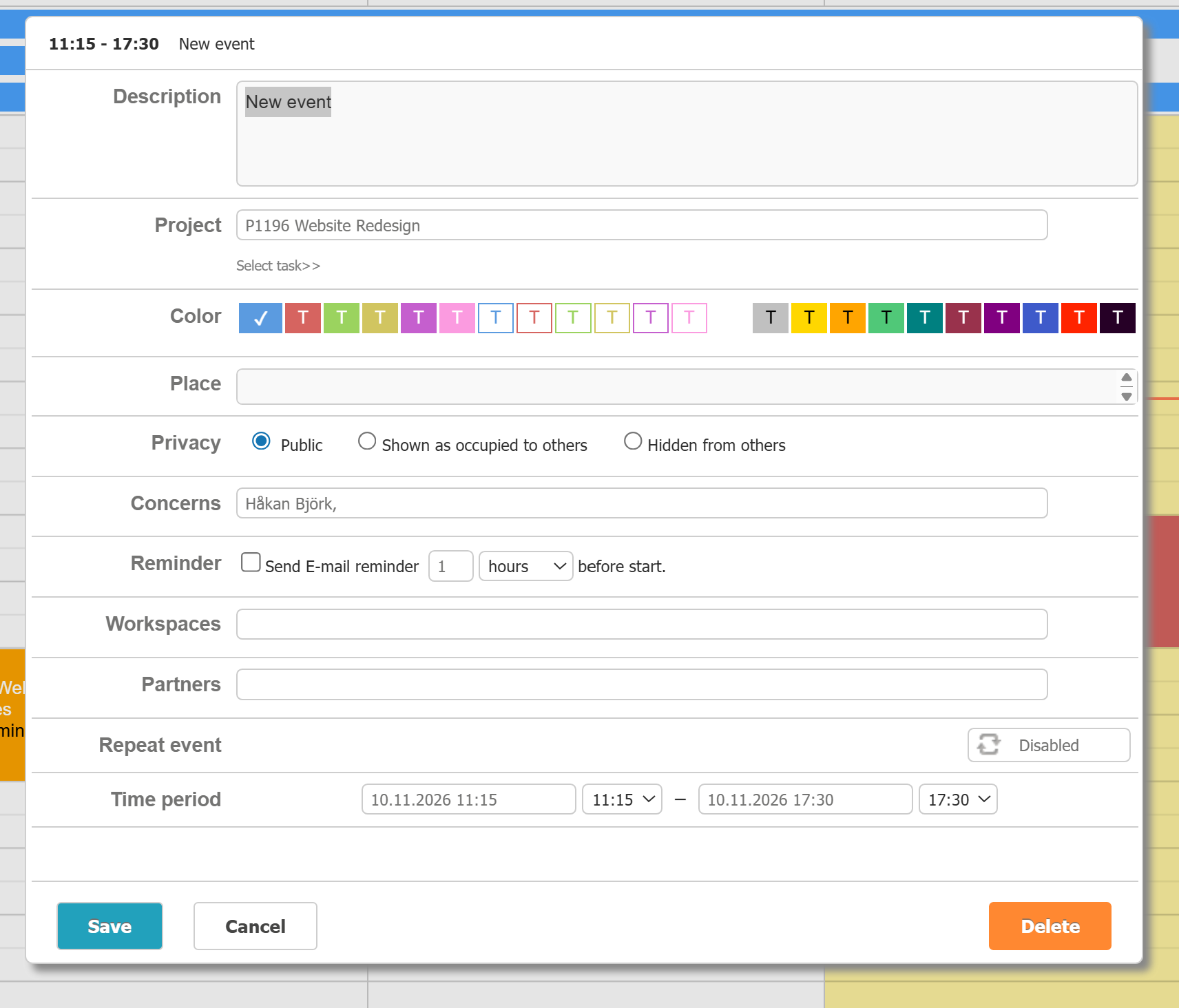
Select a date or time and add the details. Keep the note for yourself or show the same event to several users. Link it to a project or task, choose a color, and set an email reminder.
YOUR PLANNING HORIZON
Focus on today. Coordinate the week. Review the month.
Day
Focus on today’s activities and scheduled times.
Week
Plan time for focused work, follow-ups, and meetings.
Month
See upcoming dates and plan further ahead.
PROJECT, PERSONAL, AND WORKSPACE CALENDARS
Your project. Your work. Your team.
Project calendars
See scheduled project tasks alongside calendar notes for preparation, follow-ups, and meetings.
Personal calendars
Bring your scheduled assignments and calendar notes together. Reserve time for your own work and remember the small things across projects.
Workspace calendars
See scheduled activities linked to a Workspace, such as a team or department, across projects.
Show the same calendar event to several users by selecting the people concerned. Add a Workspace to include it in the team’s calendar.
Starbrix Flex calendars are optimized for mobile use, so people can keep up with their project activities while away from their desks.
CONNECTED ACTIVITY INFORMATION
Create once. Work in the view that suits you.
Create project tasks in Gantt, the Tasks table, or Kanban, or import them from a CSV file. Their scheduled dates appear in the calendar, alongside events created there.
Activities need scheduled dates to appear in calendars. Add start and finish times to place them at the relevant time of day.
KEEP THE SCHEDULE USEFUL
Edit, reschedule, and prepare for what comes next.
Maintain the plan directly
Open an activity in the calendar to change its dates or times. The updated schedule stays connected to the relevant project and personal views.
Configure event notifications
Set an email reminder before a planned activity so it is easier to remember what comes next.
ANSWERS TO COMMON QUESTIONS
Frequently asked questions
What can I use calendar notes for?
Use them to reserve time for work, remember small things, plan follow-ups, or arrange meetings. A note can be for yourself or shared with several users.
Do tasks appear automatically?
Yes. Activities created in other views appear in the relevant calendars when they have the necessary scheduled dates.
Can I switch between daily, weekly, and monthly views?
Yes. Starbrix Flex provides day, week, and month calendar views.
Can calendar notes have specific start and finish times?
Yes. Set a start and finish time to reserve the time you need for an activity.
Can I see work from several projects in my personal calendar?
Yes. Personal calendars bring together scheduled tasks and calendar entries relevant to the user across projects.
What is a Workspace calendar?
A Workspace calendar shows scheduled activities associated with a particular Workspace, such as a team, department, or functional area.
Can I share the same calendar event with several users?
Yes. Select the people concerned to show the same event in their calendars. You can also associate it with a Workspace.
Are calendars connected to Gantt and Kanban?
Yes. Scheduled project tasks appear in the calendar and share their information with Gantt, the Tasks table, and Kanban.
Can I sync Starbrix Flex with Outlook, Google Calendar, or Apple Calendar?
Yes. Projects, tasks, and calendar notes can appear in Outlook, Google Calendar, or Apple Calendar on your Mac. Choose whether to show or hide them in your calendar app. Updates are refreshed approximately once an hour.
Can calendar notes repeat automatically?
Yes. Set flexible daily, weekly, monthly, or yearly recurrence patterns, continuing indefinitely or until a chosen end date. Add email reminders to help you remember recurring activities.
Plan your work your way.
Bring project tasks and everyday plans together. Make time for things to do, follow-ups, and meetings.
Start Free60-day free trial. All features included.
