
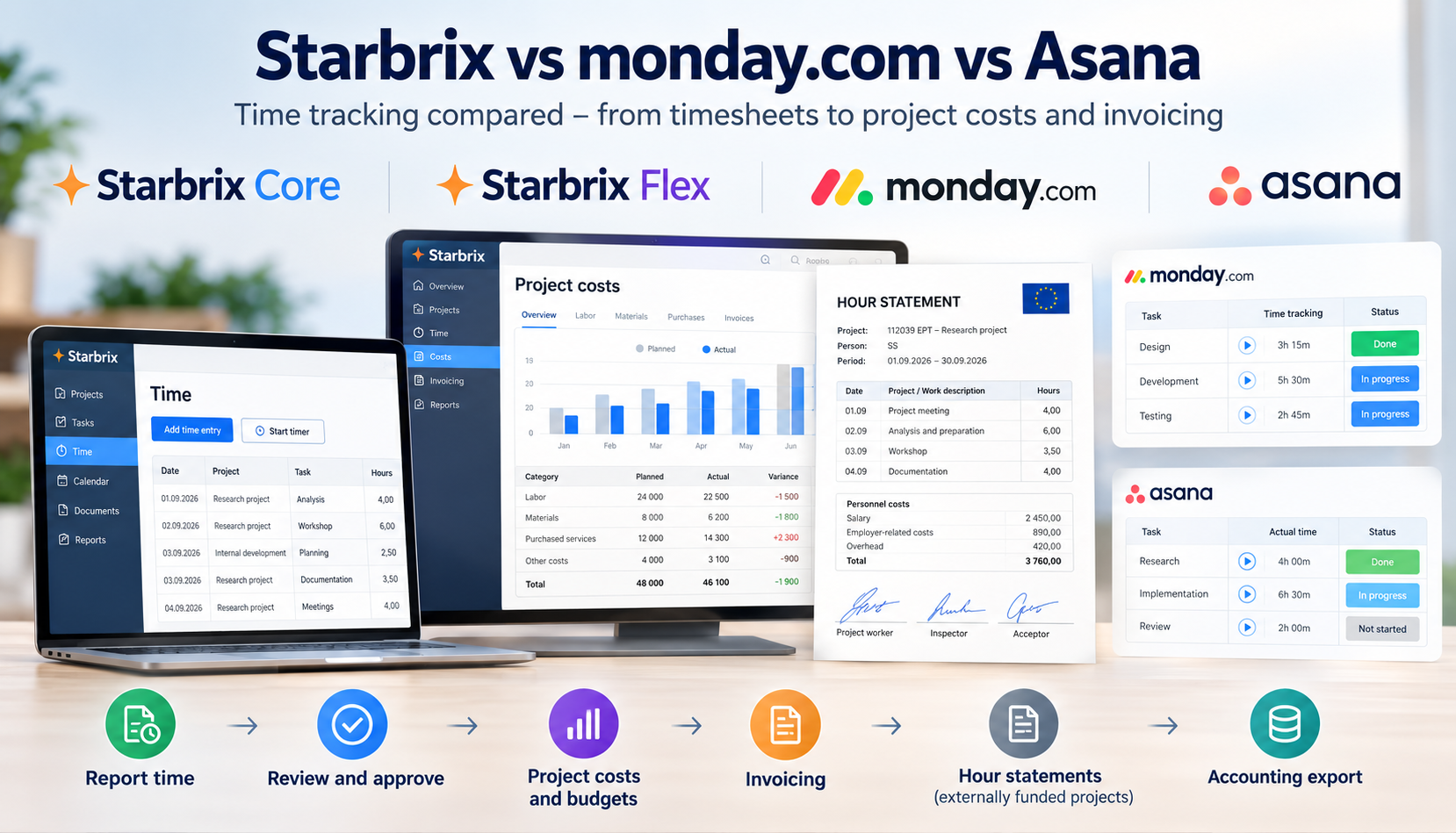
Time tracking in project management software can mean very different things.
At the simplest level, it means starting a timer or entering the number of hours spent on a task. But for many organizations, recording the hours is only the beginning. Once time has been reported, the information may need to be reviewed and approved, compared with planned hours, used to calculate project costs, included in customer invoicing, or turned into formal documentation for an external project financier.
That makes the more useful question:
What can you do with the time once it has been recorded?
Starbrix Core, Starbrix Flex, monday.com, and Asana all provide ways to track time. The differences become clearer when you follow that information through the next stages of the workflow.
How time tracking works in Starbrix
Starbrix integrates time tracking directly with projects and tasks.
Users can report time against the work they are doing, either manually or with a timer. Manual entries can be made with or without exact start and finish timestamps, depending on how the organization wants to work.
Because time is recorded against the same projects and tasks used for planning and managing the work, it becomes part of the project information rather than a separate set of timesheets.
This is true for both Starbrix Core and Starbrix Flex.
From planned work to approved actual hours
Starbrix supports a structured workflow around reported time.
Organizations can review and approve time entries using a configurable approval process. Depending on the organization's requirements, this can include multiple stages before the reported time receives final approval.
This means that time data can move through a controlled process:
Plan work → perform work → report time → review → approve → use the approved information
That last step is where the distinction between Starbrix Core and Starbrix Flex becomes particularly important.
Starbrix Core: project management and time tracking together
Starbrix Core combines everyday project management with integrated time tracking.
Team members can plan and manage work using synchronized Gantt, Kanban, Calendar, and To-do views and report their actual time against the same projects and tasks.
Reported hours can be reviewed and approved, giving organizations a controlled source of actual working-time information rather than simply a collection of timer records.
Managers can use the information to understand where time is being spent, compare planned and actual work, and analyze projects and portfolios.
For small teams, these capabilities are particularly accessible because Starbrix Core is free for organizations with up to three members, including time tracking and the time approval workflow.
Starbrix Flex: putting reported time to work
Starbrix Flex takes the same principle further.
Once time has been reported and approved, the information can be used as input to other processes instead of being entered again somewhere else.
For example, reported hours can be combined with a person's hourly cost to calculate actual labor costs. Those costs become part of the project's financial information and can be compared with planned hours, cost budgets, and other actual project costs.
Approved hours can also be used for project invoicing.
The result is a connected flow:
Reported time → approved time → project costs → financial follow-up → invoicing
For project-based organizations, this reduces duplicate data entry and makes time information useful well beyond the original time entry.
Hour Statements for externally funded projects
Starbrix Flex also provides a more specialized way of using reported time: Hour Statements.
This is intended for organizations running projects financed by the EU, foundations, funds, public bodies, or other external financiers.
Such financiers may require formal documentation of the working time charged to a project. Typically, a separate statement is required for each person and reporting period, often monthly. Requirements can vary considerably between financiers.
Starbrix Flex can generate these statements from the time already reported in the system.
Depending on the reporting requirements, an Hour Statement can include daily project hours, descriptions of the work performed, salary or hourly cost, employer-related costs and overheads. It can also show other working hours on the same days or information about work performed in other projects. The statement can include the financier's logo.
The approval process is flexible as well.
If the underlying time entries have already been electronically approved by the reporter, reviewed, and finally approved through Starbrix's normal time approval workflow, there is no need to repeat that approval simply because an Hour Statement is created.
Where the financier or organization requires the statement itself to be approved separately, Starbrix can instead manage an electronic process involving the person who performed the work, a reviewer, and a final approver. Automatic email reminders can be sent to people who have Hour Statements waiting for their action.
Finally, the hours, personnel costs, and overheads can be converted into accounting postings. Starbrix can produce posting summaries covering Hour Statements across the organization and export the information for accounting.
For organizations managing many externally funded projects, this can turn what would otherwise be a substantial administrative process into a continuation of the normal time reporting workflow.
For organizations that do not need financier-specific reporting, the same underlying principle still applies: record the time once and use the information wherever it is needed next.
Feature comparison: Starbrix Core, Starbrix Flex, monday.com and Asana
monday.com's native Time Tracking Column is available on its Pro and Enterprise plans and supports both a start/stop timer and manually entered sessions. monday.com also points users toward marketplace apps for more advanced time-tracking requirements.
Asana's native time tracking supports estimated and actual time, manual entry, and a built-in timer. Its Timesheets & Budgets add-on goes considerably further, adding timesheet submission and approval, billable/non-billable time, user rates, budgets, costs, and enhanced reporting.
monday.com's approach: flexible time tracking
monday.com approaches time tracking primarily through its Time Tracking Column.
Add the column to a board and users can start and stop a timer or manually enter a time session. The recorded information can then be used in formulas and other board configurations. The native Time Tracking Column is currently available on Pro and Enterprise plans.
This makes monday.com flexible for organizations that primarily want to capture time as part of their board-based workflows.
For more advanced time management, monday.com itself points to integrated marketplace apps. Organizations that need approval processes, specialized timesheets, or more extensive financial workflows therefore need to consider the complete configuration rather than the Time Tracking Column alone.
Asana's approach: from task time to timesheets and budgets
Asana's native time tracking allows users to estimate task duration and record actual time either manually or with a timer. Estimated and actual time can also be analyzed in project dashboards.
For organizations needing more structured time management, Asana offers its Timesheets & Budgets add-on.
This adds timesheets across multiple workstreams, submission and reviewer approval, billable and non-billable time, user rates, project budgets, and reporting on time and costs. Approved time entries can also be exported to CSV.
Asana can calculate actual project costs from reported time and configured user rates, and those costs can be monitored against project budgets and aggregated at portfolio level.
So Asana has moved well beyond simple task timers. The relevant comparison with Starbrix is increasingly about how the reported time is used in subsequent business processes, rather than whether either product can create a timesheet.
The bigger question: what happens after time is reported?
This is where time tracking becomes more than an administrative requirement.
A team member may spend only a minute reporting an hour of work, but that single time entry can potentially serve several purposes:
Project follow-up → time approval → workload analysis → labor cost calculation → budget follow-up → customer invoicing → financial reporting
In Starbrix Flex, the same information can also continue into specialized processes such as externally funded project reporting and accounting.
The objective is simple: report time once and reuse the information instead of entering the same data repeatedly in different systems.
Which approach fits your organization?
Teams primarily managing projects and working time
If the main requirement is to plan projects, manage tasks, record actual hours, approve reported time, and understand how time is being spent, Starbrix Core can cover the workflow without requiring a separate time tracking system.
This is relevant both for internal project teams and organizations delivering work for customers.
Project-based businesses
When working hours also affect project costs, profitability, and customer invoicing, the value of connecting time tracking to project financials increases.
This is where Starbrix Flex goes beyond Core. Reported hours can become actual labor costs and approved hours can continue into invoicing rather than having to be transferred manually into another process.
Asana's Timesheets & Budgets add-on also addresses a substantial part of this area through user rates, cost tracking, budgets, billable time, and timesheet approvals.
Organizations with externally funded projects
Universities, research organizations, NGOs, municipalities, associations, and other organizations may have an additional requirement: demonstrating to an external financier exactly whose working time was used in a funded project and how the corresponding personnel costs were calculated.
For these organizations, Starbrix Flex's Hour Statements add another stage to the same time-information chain.
Instead of manually assembling monthly reports from time exports, payroll information, project records, and spreadsheets, the organization can generate the required documentation from information already recorded in Starbrix.
Organizations without externally funded projects simply do not need this layer.
Choosing a time tracking system
When comparing Starbrix, monday.com, and Asana, don't stop at asking whether the software has a timer.
All three platforms can record time, and both Starbrix and Asana provide structured workflows that go substantially beyond basic time capture. monday.com provides flexible native time tracking that can be extended through configuration and marketplace apps.
Instead, consider the complete lifecycle of your time information:
How do we record it? Who needs to review or approve it? What do we want to learn from it? And what should happen to the information next?
For Starbrix, that leads to a clear distinction between the two products.
Starbrix Core integrates time tracking and approvals with everyday project management.
Starbrix Flex takes the information further, connecting reported time to project costs, financial management, invoicing and, where required, formal Hour Statements for externally funded projects.
The more uses an organization has for its reported time, the more valuable it becomes to keep that information connected throughout the process.
