
Two Project Management Solutions for Different Needs
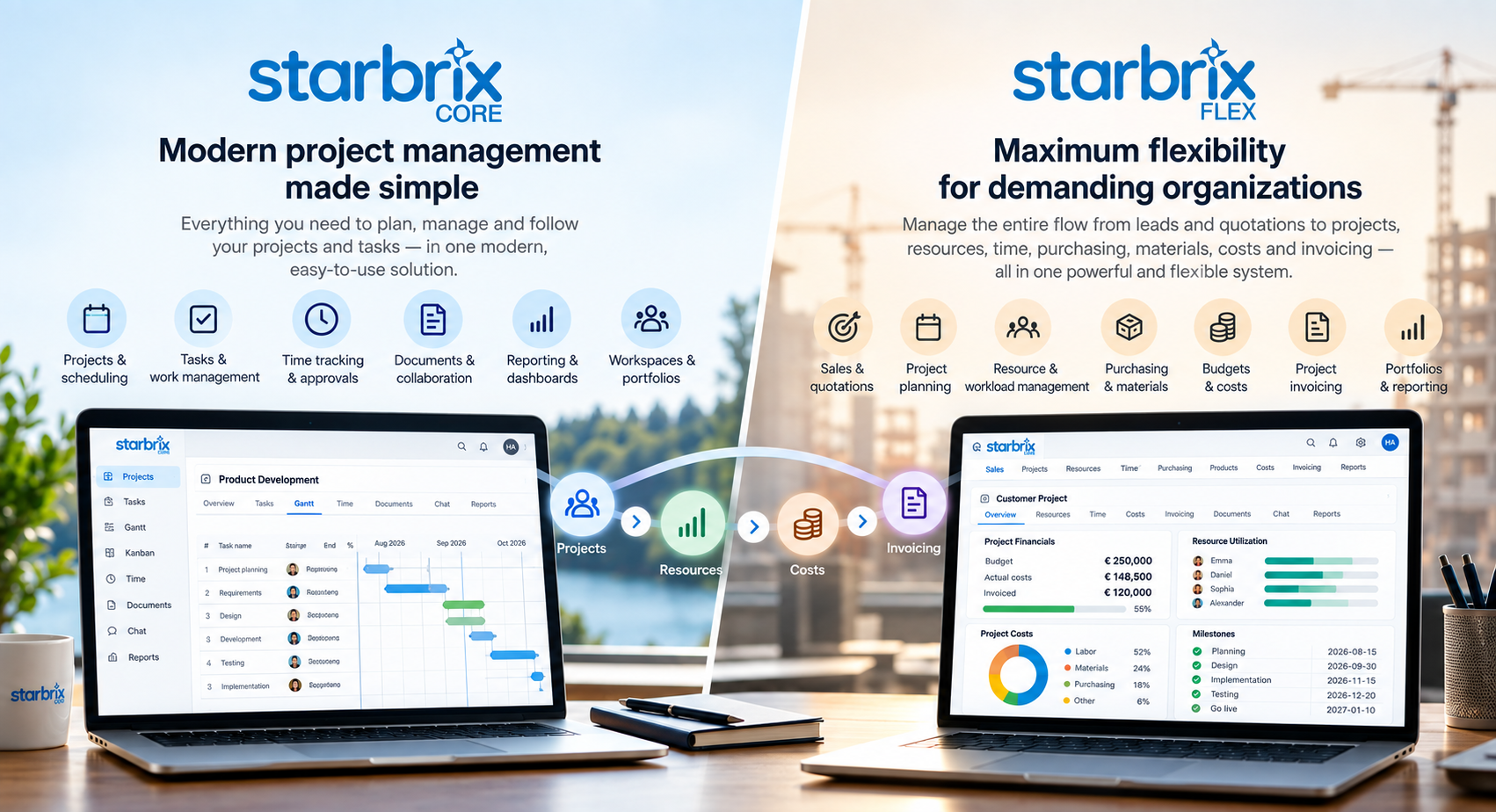
Starbrix provides two project management solutions: Starbrix Core and Starbrix Flex.
Both solutions are built on the same fundamental idea: project management software should help organizations plan and execute projects, coordinate people and work, keep information together, and provide a clear view of what is happening.
The difference lies primarily in how far the organization wants the system to extend beyond everyday project management.
Starbrix Core focuses on making project management straightforward and easy to use. It provides the essential tools needed to plan projects, manage tasks, coordinate teams, track time and progress, manage documents, communicate, and follow multiple projects.
Starbrix Flex extends project management into broader operational and business processes. In addition to project and task management, it supports resource and workload planning, sales and quotations, products and materials, purchasing, project budgets and costs, invoicing, and highly configurable workflows and information structures.
In simple terms:
Starbrix Core helps organizations manage projects and project work.
Starbrix Flex helps organizations manage projects together with the resources, finances and business processes surrounding them.
1. Starbrix Core
Modern Project Management Made Simple
Starbrix Core is designed for organizations that need capable project management without unnecessary complexity.
It brings together project planning, tasks, schedules, time tracking, documents, communication, dashboards and project portfolios in one browser-based system.
The objective is to make Starbrix Core sufficiently powerful for professional project management while remaining simple enough for the whole project team to use.
Core is therefore particularly suitable for organizations where the central questions are:
What projects do we have? What needs to be done? Who is responsible? When should it be done? How is the work progressing? How much time are we spending? And where can we find the information and discussions related to the work?
Project Planning and Gantt Scheduling
Projects can be structured into tasks and subtasks, responsibilities can be assigned, schedules created and dependencies established between activities.
Interactive Gantt charts provide a visual representation of the project schedule and make it possible to understand how individual activities relate to the overall project timeline.
Starbrix Core is not limited to displaying dates in a Gantt chart. It is intended for actual schedule management, including dependencies and changes to the project plan.
This makes Core suitable both for relatively simple projects and for projects requiring structured scheduling.
Task Management and Kanban
Not every user wants to work primarily with Gantt charts.
Starbrix Core therefore also provides task-oriented views and Kanban boards for managing everyday work. Tasks can contain responsibilities, deadlines, progress information, to-dos, documents and communication.
The same underlying project information can consequently be approached from different perspectives: a project manager may concentrate on the schedule while a team member concentrates on the tasks that need attention.
Workspaces and Project Portfolios
Projects rarely exist in isolation.
Starbrix Core allows organizations to create workspaces for different customers, teams, departments, business areas or types of projects.
Each workspace forms a natural project portfolio where related projects can be viewed and followed together.
This makes Core useful not only for managing individual projects but also for obtaining an overview of multiple projects.
Project Templates
Organizations often repeat similar types of projects.
Reusable project templates make it possible to standardize project structures and working methods. Instead of rebuilding the same project structure each time, a new project can begin with predefined tasks and structures.
This both saves time and helps organizations establish consistent project management practices.
Time Tracking and Progress
Working time can be reported directly against projects and tasks.
This connects time tracking to the actual work rather than treating it as a separate administrative process. Reported time can then be used together with progress information to understand how projects are developing.
Core also supports review and approval of reported time. The process can be configured as a simpler approval process or as a multi-stage process where time is first reviewed and subsequently approved.
Documents and Communication
Project management is not only about tasks and schedules. Projects generate documents, decisions, questions, discussions and other information.
Starbrix Core keeps these elements connected to the projects and tasks where they belong. Documents can be shared and project participants can collaborate within the system rather than having project information scattered across unrelated tools.
This is increasingly important because the context surrounding a task can be as important as the task itself.
Mobile and Browser-Based Use
Starbrix Core is fully browser-based and optimized for computers, tablets and smartphones. There is no application to install.
This is an important part of the Core concept: project participants should be able to access their projects and tasks regardless of where they are working.
2. Starbrix Flex
Project Management Connected to the Entire Business Process
Starbrix Flex starts from the same project-management foundation but goes considerably further.
It is designed for organizations where projects are closely connected with other operational processes.
Instead of beginning and ending with the project itself, Flex can support a flow such as:
Lead → Sales opportunity → Quotation → Project → Resources → Work → Time → Materials → Purchasing → Costs → Invoicing
This allows information to follow the business process instead of being repeatedly recreated in separate systems.
Flex is therefore particularly suitable when project management is an integral part of how the organization operates its business.
Sales, Leads and Quotations
In Flex, the process can begin before a project exists.
Leads and sales opportunities can be managed in the system, quotations can be prepared, and a successful opportunity can continue into project execution.
This creates continuity between sales and delivery.
Instead of treating CRM, quotation management and project management as completely separate worlds, the information can form part of the same operational process.
Project Planning with Gantt and Kanban
Flex includes comprehensive project and task management with Gantt charts and Kanban boards.
Projects can contain tasks, schedules, dependencies, responsibilities and progress information.
This means Flex is not simply an ERP or business administration system with a project number attached to transactions. Project planning and execution remain at the center of the solution.
Resource and Workload Management
This is one of the most important functional differences between Core and Flex.
Core helps teams coordinate who is doing what and when.
Flex can additionally help an organization determine whether it has enough capacity to perform the planned work.
Resources can be planned across multiple projects based on factors such as availability and competencies. Planned workload can then be compared with available capacity to identify overloads or unused capacity.
This becomes especially important in organizations where the same engineers, specialists, consultants or other limited resources work across many simultaneous projects.
There are consequently two related but different planning questions:
Schedule workload management: Who is doing what, and when?
Capacity workload management: Do we have sufficient available capacity to perform the planned work?
Both are relevant in Flex.
Products, Materials and Services
Flex can maintain a product register containing products, materials and services.
These can be connected with quotations, projects, purchasing, costs and invoicing. The system can also maintain information such as price lists and inventory levels.
This is particularly relevant for project organizations where delivering a project involves more than labor.
A project may require equipment, components, subcontracted work, materials or other services. Flex allows these elements to become part of the project structure and financial follow-up.
Purchasing and Procurement
Materials and external services required by projects can be purchased through Flex.
Purchase orders and procurement are therefore connected directly with the projects that generated the requirement.
This creates a connection between:
what was planned → what was purchased → what it cost → which project it belongs to.
For project-driven organizations, this provides much better operational visibility than managing purchasing completely separately from project execution.
Project Budgets
Another major distinction between Core and Flex is financial project management.
Flex supports project budgets covering both expected income and costs.
Budgets can be used to establish the financial plan for a project and actual values can subsequently be compared with that plan as the project progresses.
This changes the management question from simply:
“Is the project progressing according to schedule?”
to also include:
“Is the project progressing financially according to plan?”
Project Costs
Flex can connect actual project activity with costs.
Reported working hours can generate labor costs based on applicable hourly costs. Materials, purchases and other project-related items can also contribute to actual project costs.
This enables project managers and management to follow the financial performance of projects continuously rather than waiting until the project is completed.
Time Tracking and Approval
Both Core and Flex support time tracking.
In Flex, however, reported time can participate in a much broader process.
The same reported hours can contribute to:
project progress → workload analysis → labor costs → project financials → customer invoicing.
Flex supports both review and approval of reported hours, and the process can be adapted to the organization's preferred workflow.
This illustrates an important difference between the products: functionality that exists in both solutions can have a broader operational role in Flex.
Project Invoicing
Flex supports project invoicing based on actual project information.
Billable working hours, materials and other project items can form the basis of invoices. Invoice information can subsequently be transferred through integrations for electronic invoicing, email or other delivery methods.
This creates a direct connection between the work performed and the revenue generated by the project.
The operational chain can therefore become:
Plan → Perform → Report → Approve → Invoice.
Documents and Communication
Flex provides comprehensive project document management.
Organizations can create their own folder structures with multiple levels of folders and subfolders. Documents can be connected with the relevant projects and securely shared with internal and external participants.
Communication is also integrated directly into the work.
Projects and tasks can have their own chats, where participants can exchange messages and share images, videos and files. Emails can also be sent to and from projects and tasks, helping keep communication connected to the context where it belongs.
The purpose is important: discussions about delays, decisions, questions or problems should not need to disappear into unrelated Slack channels, Teams conversations or individual email inboxes.
They can remain connected with the actual project or task.
Operational Areas and Portfolios
Core uses workspaces to organize related projects.
Flex has a broader concept called Operational Areas.
Operational Areas can represent business units, departments, customers, project categories or other organizational structures. They can provide project portfolios focused on exactly the projects relevant to that operational context.
Portfolio views can combine information from multiple projects and provide management visibility across schedules, progress, resources, workload and financial information.
This makes Flex particularly suitable for organizations that need to manage not just individual projects but the overall project operation.
3. Flex Is Designed to Be Configurable
One of the defining differences between Core and Flex is the degree of configurability.
Core deliberately provides a more standardized project-management experience.
Flex is intended for organizations whose processes cannot always be forced into a standard software model.
Terminology, information structures, workflows and functionality can therefore be adapted to the organization. Flex can also be integrated with other business systems through APIs.
This does not mean every Flex implementation needs to be complex.
Quite the opposite: individual features can be enabled or disabled. An organization can expose only the functionality relevant to its users and introduce additional functionality when required.
The philosophy is therefore:
Complex capabilities do not have to mean a complex user experience.
4. The Fundamental Difference Between Core and Flex
The clearest way to understand the two products is to look at where project management begins and ends.
Starbrix Core
Core concentrates on the project and the work performed within it.
The central objects are essentially:
Projects → Tasks → People → Time → Progress → Documents → Communication
It answers questions such as:
What are we working on?
What should happen next?
Who is responsible?
When should it happen?
Are we on schedule?
How much time have we spent?
What is the status of our projects?
Where are the documents and discussions?
Starbrix Flex
Flex includes all of these project-management questions but extends the scope both before and after project execution.
The broader model becomes:
Sales → Quotation → Project → Tasks → Resources → Capacity → Time → Materials → Purchasing → Costs → Invoicing
It therefore adds questions such as:
Do we have sufficient capacity?
Which competencies are available?
What should the project cost?
What will we earn?
What materials do we need?
What needs to be purchased?
What has actually been spent?
What can we invoice?
How is the project performing financially?
That is the fundamental product distinction.
5. Feature-by-Feature Comparison
The current product pages confirm the major dividing line: Core covers project planning, tasks, portfolios, time, documents and collaboration, while Flex adds resource/workload management, sales, products/materials, purchasing, financial control, invoicing and extensive customization.
6. Core Is Not a “Light Version” of Flex
This distinction is worth emphasizing.
Starbrix Core should not be positioned simply as a smaller or cheaper Flex.
The products have different design priorities.
Core is deliberately optimized for organizations that want modern project management with a low barrier to adoption.
Flex is deliberately optimized for organizations that need greater operational depth and flexibility.
A company can therefore be relatively large and still prefer Core because its need is primarily project coordination.
Likewise, a smaller specialist organization might require Flex because resource capacity, project profitability, materials, purchasing or invoicing are essential to its business.
The choice is therefore driven more by process requirements than company size.
7. A Practical Example
Consider an engineering company managing 50 simultaneous customer projects.
With Starbrix Core, the company could plan all 50 projects, create schedules and dependencies, assign tasks, coordinate teams, report time, monitor progress, maintain documents and communication, and obtain portfolio-level visibility.
That may be everything the organization needs.
With Starbrix Flex, the same company could additionally manage sales opportunities and quotations before projects begin, determine which engineers have the required competencies, compare planned workload with available capacity, budget labor and materials, purchase components and subcontracted services, monitor actual labor and material costs, and finally invoice the customer based on the work and materials delivered.
The project itself may look similar in both products.
The difference is everything surrounding the project.
8. Two Different Levels of Workload Management
This is another distinction worth making explicit because the term workload management can mean very different things.
Schedule Workload Management
The first level concerns the schedule:
Who is doing what, and when?
Tasks, assignments, dates and dependencies provide visibility into people's planned work.
This type of workload coordination is naturally connected to project and task scheduling and is relevant in both products.
Capacity Workload Management
The second level concerns capacity:
Do we actually have enough available working capacity to perform the planned work?
This requires information about available working capacity and planned effort across projects.
This is where Flex goes significantly further.
An organization can analyze planned hours and capacity across several simultaneous projects and identify resource shortages and overloads before they become project delays. Flex can also use competencies when selecting resources.
This distinction is particularly important for engineering, consulting and other professional organizations where people are the primary constrained resource.
9. Different Approaches to Financial Management
Financial project management provides another clear dividing line.
Core
Core answers operational questions primarily through:
tasks, schedules, progress and time.
It helps the organization understand whether the work is progressing.
Flex
Flex can connect operational progress with financial information:
Budget → Planned costs → Actual labor → Purchases → Materials → Actual costs → Billable items → Invoicing
The project can therefore be managed simultaneously from a schedule, resource and financial perspective. The Flex product page specifically describes project budgets, continuous cost and income follow-up, material management, purchasing and invoicing based on actual project information.
This is one reason Flex moves toward the territory often associated with Professional Services Automation (PSA) and project-oriented business management, while still retaining project management as its foundation.
10. Standardization vs. Adaptability
There is also an important philosophical distinction between the products.
Core: Standardization
Core provides a modern, standardized way of managing projects.
Organizations can configure how they work, organize projects into workspaces and use templates, but the overall product is intended to remain recognizable and straightforward.
This makes onboarding easier and reduces administrative overhead.
Flex: Adaptability
Flex assumes that some organizations have established business processes that software must adapt to rather than replace.
Consequently, Flex can accommodate organization-specific:
workflows, terminology, data structures, processes, integrations and functionality.
This is particularly valuable when an organization has developed specialized processes over many years or operates in an industry where standard project-management software does not fully reflect how work is actually performed.
11. How to Choose Between Starbrix Core and Flex
A useful starting point is not:
“How large is our organization?”
A better question is:
“How much of our operation do we want Starbrix to manage?”
Choose Starbrix Core when the primary requirement is to:
plan projects → manage tasks → coordinate teams → track time and progress → manage documents and communication → follow project portfolios.
Choose Starbrix Flex when the requirement extends to:
sales → quotations → resources → capacity → project budgets → costs → materials → purchasing → invoicing → organization-specific workflows and processes.
There is considerable overlap between the products because both are genuine project management systems.
The difference is primarily how far beyond project management the system needs to go.
12. The Starbrix Product Philosophy
Core and Flex represent two ways of applying the same experience accumulated during more than 30 years of developing software for real project organizations.
Not every organization needs an extensive business system.
And not every organization can run its operations with a standardized project-management tool.
That is why Starbrix offers two solutions.
Starbrix Core is about making professional project management accessible, modern and easy to use.
Starbrix Flex is about extending project management into resources, finances and business processes while retaining the flexibility to adapt the system to the organization.
Or, in its shortest form:
Starbrix Core – Modern project management made simple.
Starbrix Flex – Maximum flexibility for demanding organizations.
Both share the same underlying philosophy:
Give people the information and tools they need to manage real projects successfully – without forcing every organization to work in exactly the same way.
