
PSA software comes up a lot when project and operations managers start asking whether their current toolset is actually keeping up with the work. The term gets used loosely, so it's worth being precise about what it means before deciding whether you need it.
What PSA software actually is
Professional services automation (PSA) software is a category of business software built to manage project-based service delivery from end to end, with a direct connection between the work performed and financial outcomes like billing, invoicing, and project profitability.
SAP describes PSA software as providing "a unified framework for managing project-based work across planning, assigning talent, tracking time and expenses, and managing billing and profitability" (SAP, January 2026). That framing captures it well. The core idea is that every hour worked, every expense logged, and every resource assigned eventually flows into a financial record: a client invoice, a margin report, a utilization figure.
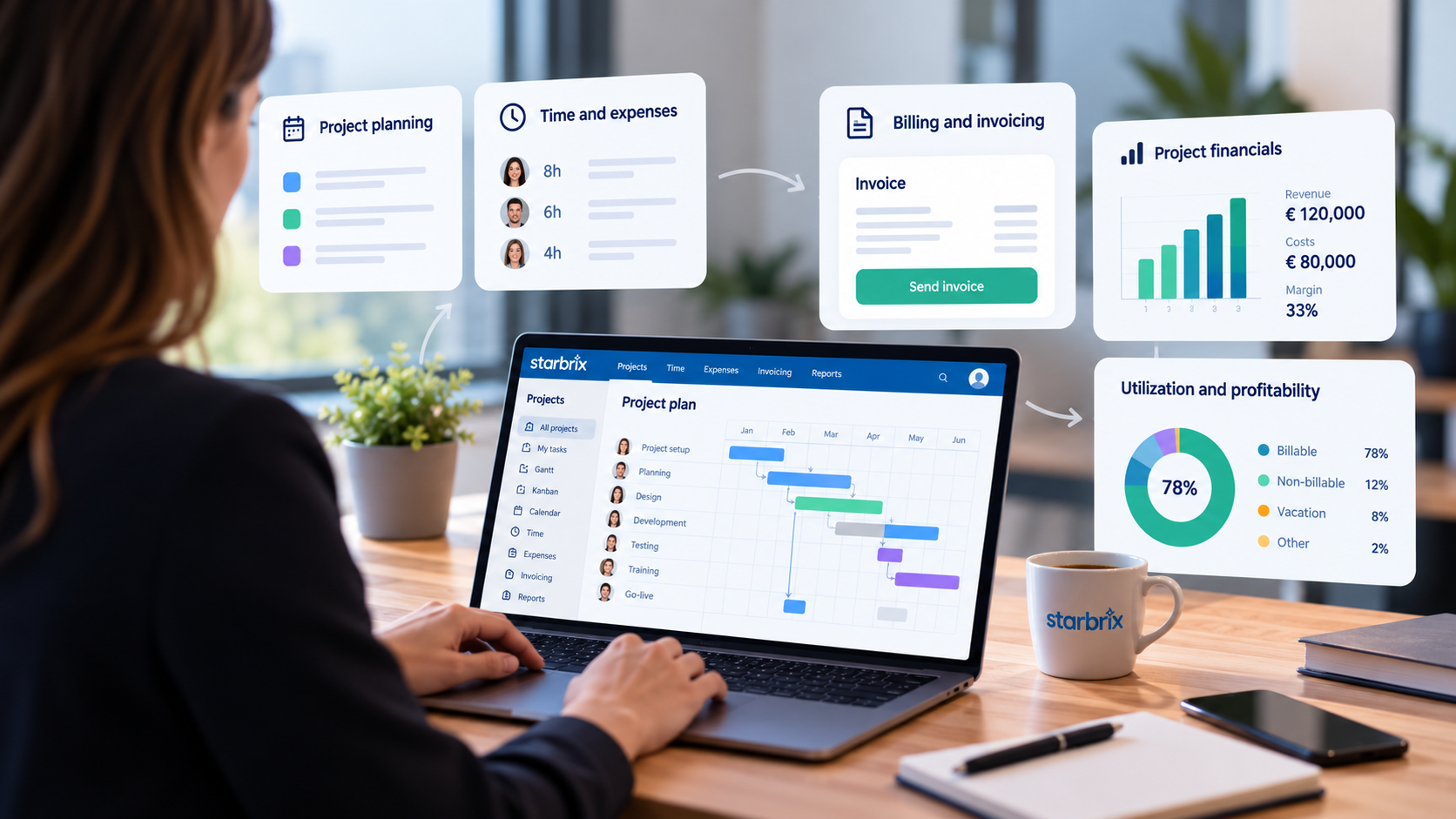
The typical PSA workflow runs roughly like this: resource planning and project setup, time and expense capture by team members, manager approvals, billing and invoice generation, project financial reporting, and then portfolio-level profitability analysis. Each step feeds the next.
What PSA is not: it's not a task tracker or a basic project planner. Those tools tell you whether work is on schedule. PSA tells you whether the engagement is delivering the expected return.
The core feature set in PSA platforms
Most PSA platforms cover a consistent set of modules:
- Time and expense tracking: Billable and non-billable hours logged against specific projects and clients, often with mobile entry and approval workflows. This is the data source for everything downstream.
- Billing and invoicing: Rules-based invoice generation tied to time/materials, fixed-fee milestones, or retainer schedules. Reduces manual effort and billing errors.
- Project financials (budget vs. actual): Real-time view of spend against budget by project, phase, or resource type. Helps catch overruns before they become write-offs.
- Utilization and profitability reporting: What percentage of each role's time is billable? Which projects or clients generate margin? Which ones don't? These are the questions PSA answers that most PM tools can't.
- Contract and resource management: Tracks engagement terms, rates, and scope alongside who is assigned to what across the portfolio.
- Accounting integrations: PSA platforms typically connect to accounting and ERP systems so that invoices, costs, and other financial data can flow between project management and accounting without re-keying. Starbrix Flex, for example, can integrate with systems such as Netvisor, Procountor, Fennoa, Visma, Fortnox, and Lemonsoft.
Without these features working together, professional services teams tend to lose billable time in the gap between delivery and accounting, rely on spreadsheets for margin analysis, and struggle to forecast capacity across a growing project portfolio.
PSA vs. project management software: the key differences
The clearest way to see the difference is to look at what each system is optimized to answer.
A PM tool answers: "What's the status of this project, and are we on schedule?" A PSA platform answers: "Is this engagement generating the margin we quoted, and are we billing everything we've earned?"
Both questions matter. They're just different questions. Starbrix Core focuses on the first question. Starbrix Flex is designed to answer both.
Do you actually need PSA software? A decision checklist
If you manage projects across multiple teams or clients, work through this list honestly. The more "yes" answers you give, the stronger the case for PSA.
- Do you need to connect reported hours directly to customer invoicing?
- Do you run fixed-fee engagements where you need to track spend vs. fee to protect margin?
- Do you manage different billing models, such as time and materials, fixed-price projects, or milestone-based billing?
- Do you need to know utilization rates (billable hours as a percentage of available hours) for individual roles or the whole team?
- Do you track project profitability by client, project type, or service line?
- Are invoices currently assembled manually from timesheet exports or spreadsheets?
- Do you have approval processes for time and expenses before billing?
- Is project labor cost a significant line item in your P&L, and do you need it tied back to specific engagements?
- Do you manage contracts with different rate structures across clients?
- Is your accounting team waiting on project data to close the month?
Who typically needs PSA: Management consultancies, IT services firms, marketing and creative agencies, engineering services providers, staffing and professional services teams billing time and materials or milestone-based fixed fees. Any team where billable time is both the product and the main revenue driver.
Who typically doesn't need PSA: Internal project teams whose work isn't billed to clients, product companies running their own roadmaps, organizations where billing is simple and handled entirely by accounting without project-level inputs, or teams with low project volume where a few spreadsheets genuinely cover the gap.
The edge case worth naming: if you're currently using "PM tool + spreadsheets" and the spreadsheets are just for scheduling or status, a better PM workflow probably solves the problem. If the spreadsheets exist because someone is manually assembling billing data from multiple sources, that's a financial control gap, and PSA is the right category to look at.
Where Starbrix fits in this picture
Starbrix spans both sides of the PM–PSA spectrum, depending on which product you choose.
Starbrix Core is designed for organizations that primarily need project management: planning projects, managing tasks, coordinating teams, tracking progress and time, sharing documents, and maintaining visibility across multiple projects. If the capabilities described in the General PM Software column above are what you need, Core provides a straightforward way to manage them without adding unnecessary financial complexity.
Starbrix Flex, on the other hand, covers the capabilities associated with PSA software. It can manage the flow from sales and quotations through projects, resource planning, time tracking and approvals, budgets, costs, purchasing, invoicing, accounting integrations, and financial reporting.
But there is an important difference in how Flex can be adopted: you don't have to implement all of that at once.
Starbrix Flex is highly configurable through its parameters and settings. An organization can start with a relatively simple project management setup and then gradually activate more advanced capabilities as its processes mature.
For example, you might begin with project planning, tasks, Gantt scheduling, resource management, and basic time tracking. Later, you can introduce time approval workflows. Then you might add project budgets and cost tracking, followed by quotations, purchasing, customer invoicing, or an integration with your accounting system.
In other words, moving toward PSA does not have to be a single large system change. With Starbrix Flex, it can be a gradual development where the system evolves alongside the organization's processes.
That makes Flex particularly relevant for organizations that know they need strong project management today but are not yet certain how far they will eventually want to go with financial management, billing, resource utilization, and other PSA capabilities.
Figuring out your next step
The choice depends less on what category you think your organization belongs to and more on what you need today — and what you may need tomorrow.
If your main requirements are project planning, task coordination, schedule visibility, time tracking, collaboration, and portfolio oversight, Starbrix Core is likely the natural starting point. You get the project management capabilities you need without introducing processes that aren't relevant to your organization.
If you already need PSA capabilities such as quotations, approval-driven time tracking, project budgets, cost control, invoicing, accounting integrations, utilization analysis, and project profitability, Starbrix Flex is the appropriate choice.
There is also a third situation, and it is a common one: you may not need a full PSA setup today, but you can see your organization moving in that direction.
In that case, Starbrix Flex can be the safer long-term choice. You can start with a simple project management setup and activate additional capabilities gradually as the need arises. Instead of replacing your project management system when your processes become more sophisticated, you can let the same system grow with you.
Start with projects and tasks. Add time approvals when you need them. Introduce budgets and cost tracking when financial control becomes more important. Add quotations, invoicing, purchasing, accounting integrations, and other PSA capabilities when your organization is ready for them.
The goal isn't to implement as many features as possible. It's to use the capabilities that support the way you work today while keeping the door open for where your project business may be heading tomorrow.
If you're not sure whether Core or Flex is the better fit, the Starbrix team can help you map your current processes and future requirements to the right setup.
