
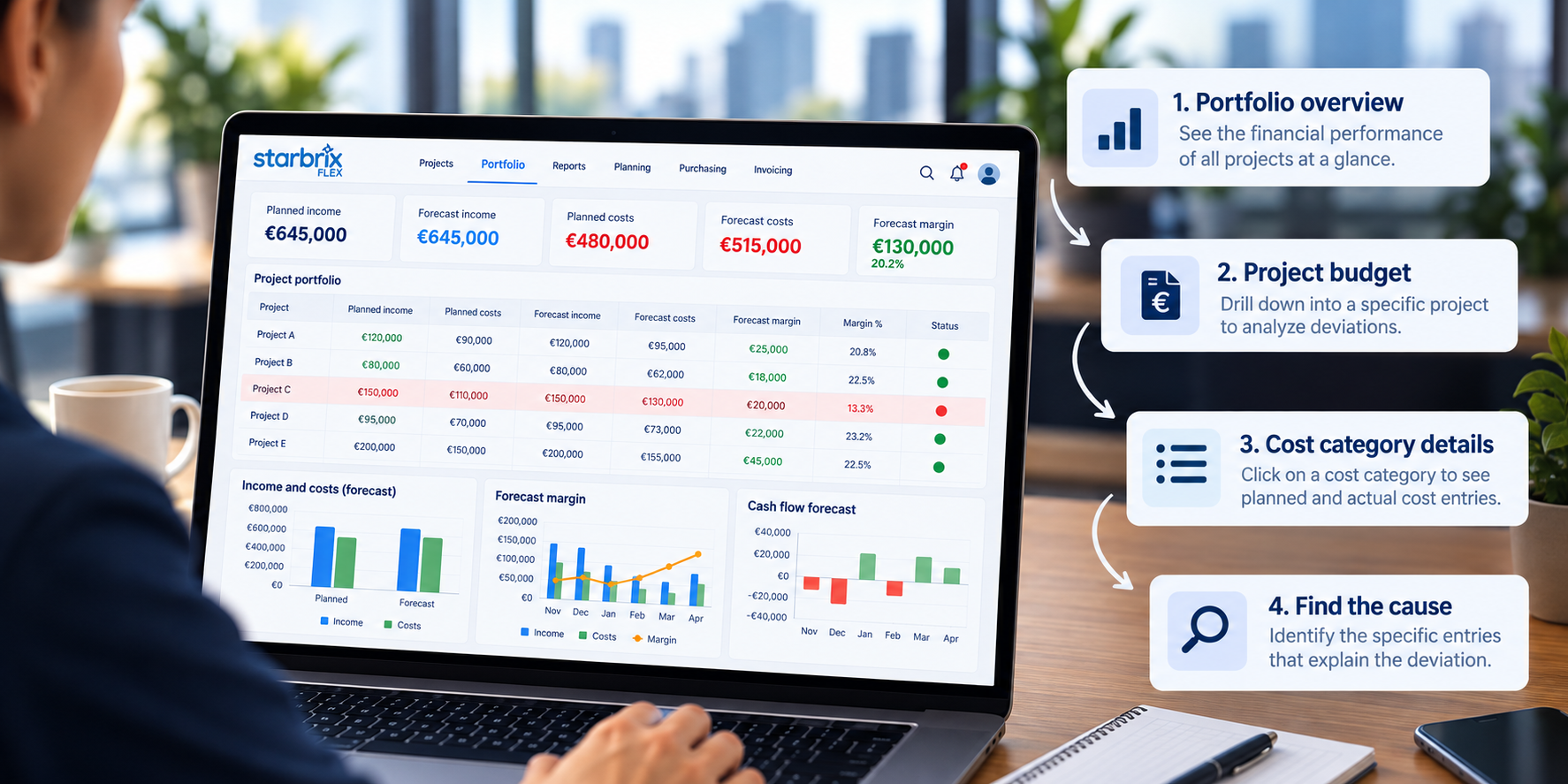
Managing the finances of one project can be challenging. Managing the budgets, costs, revenues, and cash flow of dozens or even hundreds of projects simultaneously is considerably more demanding.
Each project has its own budget, schedule, resources, purchases, and financial commitments. Some projects are profitable, others are exceeding their budgets, and some are experiencing delayed customer payments. Meanwhile, management needs to understand not only how individual projects are performing but also what their combined financial performance means for the organization.
When project budgets are maintained in separate spreadsheets, obtaining this overview becomes a time-consuming exercise. Financial information must be collected, consolidated, checked, and updated repeatedly. By the time the reports are ready, the underlying situation may already have changed.
Starbrix Flex brings project budgeting, cost tracking, financial forecasting, and portfolio-level reporting together in one integrated project management system.
In this guide, we'll explore how to use Starbrix Flex to plan project finances, monitor actual results, identify deviations, investigate their causes, forecast cash flow, and maintain financial visibility across an entire project portfolio.
1. Why Multi-Project Budget Tracking Is Challenging
Financial management becomes more complicated as the number of active projects increases.
Consider an organization managing 40 concurrent projects. Each project has its own planned income, labor costs, materials, purchased services, and other expenses. Project managers need to monitor their individual budgets, while department managers and senior management need consolidated financial information.
Without an integrated system, several problems commonly arise:
- Fragmented financial information. Project budgets, timesheets, purchase orders, and accounting records are maintained in different systems.
- Delayed cost visibility. Costs may become visible only after supplier invoices have been processed.
- Inconsistent budget structures. Different projects use different cost categories, making comparisons difficult.
- Manual consolidation. Portfolio reports require information from multiple spreadsheets and systems.
- Limited forecasting. Management can see historical costs but struggles to anticipate future expenses, revenues, and cash flow.
- Unclear profitability. A project may appear to be progressing well operationally while its financial margin is deteriorating.
The solution is not simply to create better spreadsheets.
It is to connect financial planning and monitoring directly to the projects, tasks, resources, purchases, and invoices that generate the financial results.
This is the approach taken by Starbrix Flex.
2. One Financial Overview for All Projects
One of the most important principles of multi-project financial management is that financial information should be available at several organizational levels without requiring separate reporting processes.
Starbrix Flex supports financial monitoring at three main levels.
Individual Projects
Each project can have its own financial plan, including planned income, planned costs, budgets, and actual financial results.
Project managers can monitor:
- Planned and actual income
- Planned and actual costs
- Labor costs and reported hours
- Material and purchased service costs
- Budget deviations
- Project margins
- Financial performance over different time periods
This connects financial monitoring to everyday project management.
Operational Areas
Organizations can create Operational Areas to group projects according to departments, business units, locations, customer segments, or other operational structures.
For example, an engineering company might organize its projects into Operational Areas such as Engineering, Installation, Maintenance, and Product Development.
Managers can then monitor the projects and financial results relevant to their own areas.
Operational Areas are optional. They provide additional ways to organize and analyze projects without limiting organization-wide visibility.
Organization-Wide Project Portfolio
Starbrix Flex provides an organization-wide portfolio view covering all projects by default.
Management can monitor financial information across the entire project portfolio, including planned and actual income, costs, hours, and margins.
Portfolio views can be filtered by time period, allowing managers to analyze the current month, selected periods, or overall project performance.
Instead of asking every project manager to prepare a separate financial report, management can work directly with the information maintained in Starbrix Flex.
The same underlying project data supports operational project management, departmental oversight, and organization-wide financial control.
3. Plan Project Income and Costs
Effective project budget tracking begins with a clear financial plan.
Starbrix Flex allows organizations to plan both the income they expect to receive and the costs they expect to incur.
Planning Project Income
Planned income can be entered as a total amount or divided into multiple expected payments.
For example, consider a project with a contract value of €120,000.
This approach supports both revenue planning and cash flow forecasting.
Projects with simple financial structures can use a single planned income amount, while more complex projects can plan several payments according to their contracts.
Planning Project Costs
Starbrix Flex supports up to 30 cost categories, allowing organizations to structure their project budgets according to their operational and financial requirements.
Typical categories include:
- Internal labor
- Materials
- Purchased services and subcontracting
- Equipment
- Travel
- Other project-related costs
Costs can be entered as total amounts or calculated using quantities and unit prices.
For example:
With planned income of €120,000 and planned costs of €102,000, the project has an expected margin of €18,000, or 15%.
Planning When Costs Will Occur
Financial planning is not only about how much a project will cost. It is also about when those costs are expected.
Starbrix Flex allows planned costs to be associated with dates or periods.
For example, materials may be needed in November, subcontracting services in December, and internal labor throughout several months.
This information becomes particularly valuable when forecasting cash flow across multiple projects.
4. Budget at Project Level, Task Level, or Both
Not every project requires the same level of budgeting detail.
A small internal project may need only a simple project-level budget. A large customer project may require detailed cost planning for individual tasks.
Starbrix Flex supports both approaches, and they can be combined.
Project-Level Budgeting
At project level, managers can enter planned income and costs directly into the project's financial plan.
This is often sufficient for projects where detailed task-level cost planning would provide little additional value.
For example, a consulting project might have:
- Planned income: €50,000
- Planned labor costs: €30,000
- Planned travel and other costs: €5,000
- Planned margin: €15,000
The project manager can monitor the overall financial performance without maintaining a detailed cost budget for every task.
Task-Level Budgeting
For more complex projects, costs can be budgeted directly on individual tasks.
Consider a warehouse installation project with tasks such as:
These task budgets contribute to the project's overall financial plan.
This allows project managers to identify which activities are responsible for cost deviations rather than seeing only an unexplained difference in the total project budget.
Combining Project-Level and Task-Level Budgets
One of the most useful possibilities in Starbrix Flex is combining the two approaches.
For example, an organization may:
- Plan customer income at project level.
- Plan labor and material costs primarily at task level.
- Maintain other project-wide costs directly at project level.
This gives the organization detailed control where it matters without requiring unnecessary administrative work.
The goal is not to make every budget as detailed as possible. It is to use the level of detail that supports better decisions.
5. Plan and Track Labor Costs
For many project-based organizations, labor is one of the largest cost components.
Accurate labor cost tracking is therefore essential for understanding project profitability.
Starbrix Flex connects employee cost rates, planned work, and reported hours to project financial monitoring.
Employee Hourly Costs
Each employee can have a default hourly cost rate.
This rate can reflect salary-related costs and other employment expenses according to the organization's accounting practices.
For example:
As employees report their working hours, those hours can be converted into actual project labor costs.
Project- and Task-Specific Cost Rates
The standard hourly cost can be overridden for individual projects or tasks.
This is useful when the same employee's cost should be calculated differently depending on the work being performed.
For example, a specialized assignment may involve additional expenses that justify a higher cost rate.
Separate Billing Rates
Starbrix Flex also supports hourly billing rates that can be defined for individual employees at project and task level.
This allows organizations to distinguish between the internal cost of work and the amount charged to the customer.
For example, an engineer might have an internal hourly cost of €45 and a customer billing rate of €95.
This distinction is important for monitoring profitability, especially in projects billed according to time and materials.
By connecting time tracking to project finances, organizations can monitor labor costs continuously rather than waiting for separate payroll or accounting reports.
6. Track Planned, Ordered, and Actual Costs
One of the greatest challenges in project cost management is identifying financial problems early enough to take corrective action.
If a project manager only sees costs after invoices have been processed, the opportunity to influence those costs may already have passed.
Starbrix Flex connects project budgets with purchasing and material management, allowing organizations to follow costs through different stages.
Planned Costs
The project budget defines what the organization expects to spend.
For example, a project may have a materials budget of €20,000.
Ordered Costs
When materials or services are ordered, the purchasing information can be linked to the project.
Suppose the project manager orders materials worth €22,000.
The organization can now identify that purchasing commitments have exceeded the original materials budget, even before all supplier invoices arrive.
Actual Costs
As materials are received, used, or actual costs are recorded, the financial information can be updated.
An illustrative situation might look like this:
The actual costs are still below the budget, but the purchasing commitments already indicate a potential overrun.
This distinction is essential.
Actual costs show what has already happened. Purchasing commitments help reveal what is likely to happen next.
By connecting budgets, purchasing, materials, and actual costs, Starbrix Flex supports more proactive financial management.
7. Connect Actual Income and Costs to Accounting
A project budget becomes much more valuable when planned figures can be compared with actual financial results.
Starbrix Flex can obtain actual income and cost information through several methods, depending on the organization's processes and integrations.
These include:
- Manual financial entries
- Operational information maintained in Starbrix Flex
- Customer invoicing
- Accounting system integrations
- Reported employee hours converted into labor costs
Starbrix Flex supports integrations with accounting systems such as Netvisor, Procountor, Fennoa, Lemonsoft, and Fortnox, with integration capabilities and configuration depending on the system.
For example, actual income may be obtained from customer invoices, while actual purchased service costs may come from accounting records.
Avoid Duplicate Financial Entries
When multiple sources are connected, it is important to define how each type of financial information is updated.
For example, if a cost has already been recorded through Starbrix purchasing and is later imported from accounting, the process must ensure that it is not counted twice.
The objective is to maintain consistent, reliable financial information without unnecessary manual re-entry.
Organizations should also establish appropriate reconciliation routines to ensure that project financial figures remain aligned with their accounting records.
8. Compare Budgets, Baselines, and Actual Results
Financial monitoring requires a clear understanding of what is being compared.
Four concepts are particularly important.
Approved baseline: The approved reference budget against which project performance is evaluated.
Current plan: The project's latest financial plan, which may change as the project develops.
Actual results: Income and costs that have already been recorded.
Forecast: The expected financial outcome based on actual results and the remaining work.
Starbrix Flex supports approved cost and hour baselines, allowing project managers to compare actual performance against established reference values.
Example: A Materials Cost Overrun
Consider the warehouse installation project introduced earlier.
Its original financial plan was:
During execution, the project experiences an unexpected materials price increase of €4,500.
Assuming the project income remains unchanged and no other costs change, the revised outlook becomes:
Although the project remains profitable, its expected margin has decreased by 25%.
This is a much more meaningful warning than simply observing that material costs increased by €4,500.
The project manager can investigate the cause, consider alternatives, and evaluate whether corrective action is possible.
The approved baseline provides the reference for understanding how the project's financial position has changed.
9. Forecast Cash Flow Across Multiple Projects
A project can be profitable and still create cash flow problems.
For example, a company may need to pay employees, suppliers, and subcontractors several months before receiving the corresponding customer payments.
When many projects run simultaneously, these timing differences can become significant.
Starbrix Flex supports cash flow forecasting based on planned income and costs and their expected timing.
Cash Flow at Project Level
Consider a project with the following expected financial movements:
Illustrative figures; this simplified example excludes taxes and other payment timing adjustments.
The project is expected to generate a positive financial result of €18,000. However, it also requires financing during the early stages.
This is why profitability and cash flow must be monitored separately.
Cash Flow Across the Entire Portfolio
Starbrix Flex can consolidate planned financial movements across projects.
Cash flow forecasts can be analyzed at project level, Operational Area level, and organization-wide level.
This allows management to identify periods when several projects may require substantial cash outflows simultaneously.
For example, five profitable projects may all require major material purchases in November, while their customer milestone payments are scheduled for January.
Without portfolio-level cash flow visibility, this situation may be difficult to anticipate.
With consolidated forecasting, management can plan financing needs, adjust purchasing schedules where appropriate, or negotiate payment terms in advance.
10. Monitor Financial Performance Across the Entire Project Portfolio
The real value of multi-project budget tracking becomes apparent when financial information from individual projects is consolidated into a common portfolio view.
Consider an organization managing five projects.
Illustrative portfolio figures showing original budgets and updated forecasts.
The original planned portfolio margin was €165,000.
The updated forecast margin is €130,000.
This represents a deterioration of €35,000, or approximately 21% of the original expected margin.
However, the portfolio totals alone do not explain where the problem originates.
Identify the Projects That Need Attention
A closer examination reveals that Project C has experienced the largest increase in forecast costs.
Its original planned costs were €110,000, but the latest forecast is €130,000.
The project accounts for €20,000 of the portfolio's €35,000 cost increase.
Management can now focus on understanding why this particular project's expected costs have increased.
Investigate the Causes Behind Cost Deviations
Identifying a project with a cost overrun is only the first step. The next question is what caused it.
Starbrix Flex makes this investigation straightforward.
Suppose the project manager opens Project C's budget and discovers that labor costs and purchased services are within budget, but actual material costs have exceeded the planned amount.
By clicking the Materials cost category heading in the budget, a detailed window opens, listing the individual planned and actual material costs.
This allows the project manager to examine the underlying entries and identify which items are responsible for the deviation.
Sometimes the explanation is a genuine cost increase, such as higher material prices, additional quantities, or unexpected purchases.
In other cases, the deviation may result from incorrect financial data. For example, an expense may have been recorded twice, or a decimal error may have caused an incorrect amount to be entered.
By examining the individual entries, the project manager can distinguish between actual cost overruns and reporting errors.
This is particularly valuable because the appropriate action depends on the cause. A genuine cost increase may require corrective measures or an updated forecast, while an incorrect entry simply needs to be corrected.
Instead of merely showing that a project is over budget, Starbrix Flex helps users investigate why — directly from the project budget, down to the individual cost entries.
This ability to move from organization-wide financial figures to individual projects, cost categories, and underlying transactions makes financial monitoring both more efficient and more reliable.
Compare Different Time Periods
Starbrix Flex also supports financial reporting for selected time periods.
For example, management may want to see:
- Planned and actual income during the current month
- Planned and actual costs during the current quarter
- Financial performance across all active projects
- Total financial results over a longer period
- Differences between projects or Operational Areas
This allows the same financial information to support both day-to-day operational decisions and longer-term management reviews.
11. Make Financial Monitoring Part of Everyday Project Management
Technology alone does not guarantee effective financial control.
Organizations also need clear responsibilities and practical routines for keeping project information current.
However, these routines should be integrated into normal project management rather than becoming a separate reporting bureaucracy.
Project Managers Maintain Their Projects
Project managers should ensure that planned costs, expected income, purchasing information, and other relevant financial data are updated as projects progress.
They should regularly review deviations and investigate unexpected changes.
Operational Managers Monitor Their Areas
Managers responsible for departments or business units can use Operational Areas to monitor relevant projects.
They can identify projects requiring attention and coordinate corrective actions across their teams.
Senior Management Reviews the Entire Portfolio
The CEO and management team can use the organization-wide portfolio to evaluate financial performance across all projects.
This includes understanding which projects are performing according to plan, which are experiencing problems, and how the combined results affect the organization.
Establish a Practical Review Routine
A straightforward review process might include:
The exact routine depends on the organization's project volume, financial exposure, and management requirements.
Avoid Parallel Spreadsheet Reporting
A common problem when introducing project management software is continuing to maintain the same project information in spreadsheets.
This creates duplicate work and uncertainty about which information is correct.
Organizations should instead aim to make Starbrix Flex their central source of project information.
If some financial information still needs to be maintained outside the system, the organization should investigate why.
Perhaps users need additional training, existing features are not being used effectively, or a particular workflow requires further configuration.
Starbrix Flex is designed to be flexible and customizable, allowing the system to evolve as operational requirements change.
Management plays an important role by using Starbrix Flex in its own project and portfolio reviews.
When project managers know that management decisions are based on information maintained in the system, keeping that information accurate becomes a natural part of their work.
12. Connect Financial Management to the Entire Project Lifecycle
Multi-project budgeting becomes even more valuable when financial information is connected to the operational processes that generate it.
Starbrix Flex is not limited to budgeting and reporting.
It supports an integrated process that can include:
Sales and quotations: Plan potential project income before execution begins.
Project planning and scheduling: Organize the tasks, dependencies, and resources required to deliver the project.
Resource and workload management: Plan work and monitor resource requirements across projects.
Time tracking and approvals: Record employee hours and use approved time information for cost tracking and invoicing.
Purchasing and materials: Plan materials and services, manage purchase orders, and follow their financial impact.
Project budgets and costs: Compare planned and actual financial performance.
Project invoicing: Generate customer invoices based on the project's commercial arrangements and operational information.
Accounting integrations: Connect project financial information with the organization's financial systems.
Portfolio reporting: Consolidate operational and financial information across projects and the entire organization.
Organizations do not need to activate every capability immediately.
A company may begin with project planning, budgeting, and financial monitoring, then introduce more advanced purchasing, resource management, or invoicing workflows as needed.
This flexibility allows Starbrix Flex to support both relatively straightforward project environments and complex project-based operations.
13. Getting Started with Multi-Project Budget Tracking in Starbrix Flex
Organizations introducing portfolio-level financial monitoring do not necessarily need a large implementation project.
A practical approach is to begin with a manageable number of projects and expand gradually.
Step 1: Define Your Financial Structure
Agree on the cost categories and financial information needed for project and portfolio reporting.
Use a consistent structure across projects wherever practical.
Step 2: Select a Few Representative Projects
Choose projects with different characteristics, such as a small internal project, a customer delivery project, and a larger project involving materials and subcontractors.
This helps ensure that the financial structure supports different operational requirements.
Step 3: Enter Planned Income and Costs
Create the project budgets using project-level planning, task-level planning, or a combination of both.
Add expected payment dates and cost periods where cash flow forecasting requires them.
Step 4: Connect Operational and Financial Actuals
Establish how reported hours, purchases, invoices, and accounting information will contribute to actual project costs and income.
Ensure that the same financial transaction is not counted more than once.
Step 5: Review the Portfolio
Use the organization-wide financial overview to compare projects and identify deviations.
If appropriate, create Operational Areas to provide additional financial visibility for departments or business units.
Step 6: Expand Across the Organization
Once the approach works for the initial projects, apply it to the remaining project portfolio.
Agree on a minimum set of financial information that should be maintained for every relevant project.
This creates a consistent foundation for reliable financial reporting and management decisions.
Conclusion: From Separate Project Budgets to Integrated Financial Control
Managing the finances of multiple projects requires more than tracking whether individual projects remain within their budgets.
Organizations need to understand planned and actual income, labor costs, purchasing commitments, profitability, and future cash flow — both for individual projects and for the entire project portfolio.
Starbrix Flex brings these capabilities together in one flexible system.
Project managers can plan and monitor the finances of their projects. Operational managers can oversee the projects within their areas. Senior management can follow the financial performance of the entire organization without relying on manually consolidated spreadsheets.
And because financial information is connected to project planning, tasks, time tracking, purchasing, and invoicing, it becomes part of everyday project operations rather than a separate reporting exercise.
When deviations occur, users can investigate the underlying cost entries directly from the project budget, helping them distinguish genuine financial problems from incorrect reporting data.
The result is better financial visibility, earlier identification of problems, more reliable financial information, and more informed decisions across the entire project portfolio.
Bring Your Project Finances Together with Starbrix Flex
Whether your organization manages a handful of projects or hundreds of concurrent projects, Starbrix Flex can be configured to support your financial management processes.
From project budgets and labor costs to purchasing, invoicing, cash flow forecasting, and portfolio reporting, Starbrix Flex helps you connect operational project management with financial control.
Contact Starbrix to discuss how Starbrix Flex can support your organization's project budgeting and financial management needs.
