Best Project Management Software with Gantt and Kanban for Small Teams: a guide
Discover the best project management software with Gantt charts and Kanban boards for small teams. Compare features, mobile usability, and pricing.
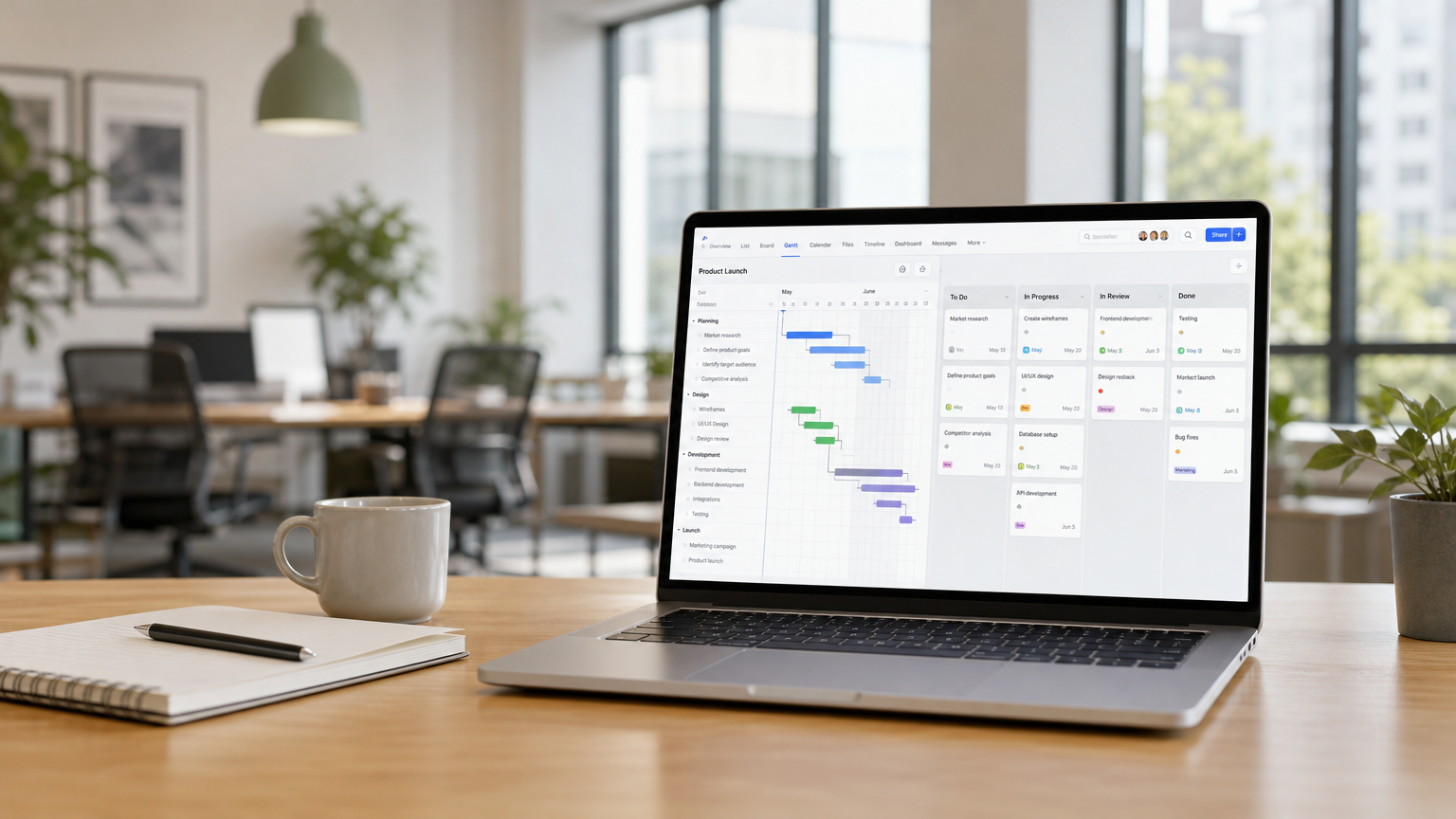
Small teams need project management software that makes planning and daily work easier, not more complicated. When several people work on multiple projects, combining Gantt charts for scheduling and Kanban boards for daily task management can make a significant difference.
Gantt charts show when work should happen and how activities depend on one another. Kanban boards show what everyone is working on and how tasks are progressing.
The real advantage comes when both views work with the same project data. Team members can manage their work in Kanban while project managers plan and monitor schedules in Gantt, without maintaining separate information.
But not all project management tools combine these capabilities equally well. Some offer only basic timelines, others limit Gantt functionality to expensive subscription plans, and some are difficult to use on mobile devices.
This guide explains what small teams should look for and how to choose a tool that combines Gantt and Kanban effectively.
Why Use Gantt and Kanban Together?
Gantt charts and Kanban boards serve different but complementary purposes.
Gantt Charts: Plan and Coordinate the Schedule
A Gantt chart displays project activities on a timeline, helping you understand:
- When tasks should start and finish.
- How long activities are expected to take.
- Which tasks depend on others.
- How schedule changes affect subsequent activities.
- Whether the project is progressing according to plan.
For example, a product development team can use a Gantt chart to coordinate design, prototyping, testing, and production preparation.
If testing cannot begin until the prototype is completed, the dependency can be defined directly in the schedule.
Kanban Boards: Manage Daily Work
A Kanban board organizes tasks into columns representing their workflow status.
A typical board might contain:
Not Started → In Progress → Completed
Team members can immediately see what needs to be done, what is currently underway, and what has been completed.
The same product development team might use Kanban to manage design activities, testing tasks, and technical documentation.
The Gantt chart provides the scheduling perspective, while Kanban makes everyday work easy to follow and update.
Which View Should You Use?
The important point is that team members should not have to choose one approach for the entire organization.
The best project management software allows different people to use different views of the same tasks.
The Key Advantage: Gantt and Kanban Working Together
Imagine a task called "Test Prototype," scheduled for November 10–12.
The project manager sees the task in the Gantt chart, including its planned dates and dependencies.
The engineer responsible for testing sees the same task on the Kanban board and moves it from Not Started to In Progress.
The project manager immediately sees the updated status without requesting a separate progress report.
If the planned dates are changed in Gantt, the updated dates also appear on the Kanban card.
This is how Starbrix Core works. Its Gantt, Table, Kanban, and Calendar views use the same underlying project and task data.
Changes made in one view are reflected in the others, providing a consistent picture of project schedules and progress.
For small teams, this means less administration and more freedom for everyone to work in the way that suits them best.
What Should Small Teams Look for in a Gantt and Kanban Tool?
1. A Real Gantt Chart, Not Just a Timeline
Not every tool that displays tasks as bars on a calendar provides genuine scheduling functionality.
A basic timeline may show when activities are planned, but it may not support dependencies or automatically adjust related tasks when the schedule changes.
A useful Gantt chart should allow you to:
- Set planned start and finish dates.
- Create dependencies between tasks.
- Adjust schedules when plans change.
- Organize work into main tasks and subtasks.
- Monitor deadlines and project progress.
Starbrix Core supports four types of task dependencies: Finish-to-Start, Start-to-Start, Finish-to-Finish, and Start-to-Finish, including lead and lag times.
This makes it possible to model different relationships between activities rather than simply displaying them on a timeline.
For organizations requiring more advanced scheduling, Starbrix Flex additionally provides critical path analysis and multi-project resource capacity planning.
2. A Kanban Board That Makes Daily Work Easy
Kanban should be intuitive enough that team members can immediately understand their assignments and update progress.
Look for features such as:
- Drag-and-drop task management.
- Customizable workflow statuses.
- Clear task responsibilities.
- Task dates visible on cards.
- Easy access to task details.
Starbrix Core supports Kanban boards at several levels:
Project Kanban: Manage tasks belonging to an individual project.
Workspace Kanban: See tasks from multiple projects associated with a particular team or department.
Personal Kanban: See your own tasks across different projects.
For example, an engineer working on three customer projects can use a personal Kanban board to follow relevant tasks without constantly switching between projects.
Meanwhile, the project managers can continue using Gantt charts to coordinate schedules.
3. Automatic Synchronization Between Views
This is one of the most important capabilities to verify when comparing tools.
When a task is moved to another Kanban column, its status should change throughout the system.
When its planned dates are adjusted in Gantt, the updated dates should be visible wherever the task appears.
Starbrix Core provides four synchronized views:
All four views work with the same project and task information.
This allows project managers and team members to use different views without creating separate versions of the project plan.
4. Full Mobile Support
Small teams do not always work at their desks.
Engineers may be visiting customers, supervisors may be working on construction sites, and team members may need to check assignments while traveling.
A modern project management tool should therefore work well on smartphones and tablets, not just desktop computers.
Starbrix Core is fully adapted for mobile use. Its responsive interface is designed to work on smartphones, tablets, and computers.
Team members can access their projects, review tasks, update statuses, and manage their work directly from their mobile devices.
This is particularly useful with Kanban. An employee can check assigned tasks, open task details, and update progress without returning to the office.
Because Starbrix Core is cloud-based, the same project information is available across devices.
When comparing tools, do not simply check whether they offer mobile access. Try performing your everyday tasks on a smartphone and evaluate how convenient the experience actually is.
5. A Clear Overview of Multiple Projects
Even a small team may be managing several projects simultaneously.
While individual Gantt charts and Kanban boards help organize project work, managers also need to see what is happening across the organization.
Look for software that makes it easy to find projects, review schedules, and identify activities requiring attention.
Starbrix Core provides an organization-wide overview of all projects by default.
For additional organization, Workspaces can group related projects and tasks.
For example, a company might have Workspaces for Engineering, Marketing, and Product Development. Each team can use its own Kanban board to manage relevant activities across projects.
Workspaces are optional, so teams can begin with the organization-wide overview and introduce additional groupings when needed.
6. Reusable Project Templates
If your team regularly carries out similar projects, reusable templates can significantly reduce planning time.
A good project template should preserve the typical task structure, planned durations, and dependencies.
Starbrix Core supports project templates that can be used to create new projects based on a planned start or finish date.
For example, a company that regularly installs similar equipment can create a standard project schedule once and reuse it for each installation.
The new project's task dates are adjusted to its schedule while preserving the planned durations and dependencies.
This provides a consistent starting point without having to recreate the Gantt chart and task structure for every project.
7. Straightforward Pricing
Small teams should pay attention to which capabilities are included in each subscription plan.
Some project management tools offer Kanban in their entry-level plans but require an upgrade for Gantt charts, task dependencies, or portfolio views.
Before choosing a tool, check:
- Are both Gantt and Kanban included in the selected plan?
- Are task dependencies supported?
- Are there limits on the number of projects or tasks?
- Can all team members use the views they need?
- How does pricing change as the team grows?
A low advertised subscription price is not necessarily a good deal if essential functionality requires a more expensive plan.
Starbrix Core is free for personal use and for organizations with up to three members. Paid access is available for larger teams, with different access levels and volume discounts.
Comparing Project Management Tools with Gantt and Kanban
Several well-known project management platforms offer Gantt charts, Kanban boards, or both.
These include Asana, ClickUp, monday.com, Teamwork, TeamGantt, and Starbrix.
Their approaches differ. Some emphasize task boards and provide Gantt functionality as an additional view, while others focus primarily on scheduling.
The following checklist helps identify what matters most for a small team.
Rather than counting features, evaluate how naturally each tool supports the way your team actually works.
For a more detailed comparison, see Gantt and Kanban in One Tool: 7 Platforms Compared.
Why Starbrix Core Is a Strong Choice for Small Teams
Starbrix Core is designed to make project planning and daily task management work naturally together.
Its main advantages for small teams include:
- Gantt and Kanban in one system: Plan schedules and manage daily tasks using the same project data.
- Four synchronized views: Switch between Gantt, Table, Kanban, and Calendar without duplicating information.
- Fully mobile-adapted interface: Manage projects and tasks conveniently from smartphones, tablets, and computers.
- Flexible Kanban boards: Work with project-specific, Workspace, or personal task boards.
- Real scheduling capabilities: Create task dependencies and manage project timelines.
- Organization-wide project visibility: Follow all projects from one overview.
- Reusable templates: Create new projects quickly using predefined structures and schedules.
- Free entry plan: Start with up to three organization members at no cost.
For a small engineering consultancy, product development team, marketing agency, or other project-based organization, this combination provides both scheduling control and practical daily task management.
When Would Starbrix Flex Be a Better Choice?
Starbrix Flex is intended for organizations that need more advanced capabilities alongside Gantt and Kanban.
These include critical path analysis, multi-project resource capacity planning, project budgeting, purchasing, and invoicing.
If your primary requirement is to combine project scheduling with straightforward task management, Starbrix Core is generally the simpler starting point.
If you also need advanced resource scheduling and financial management, Starbrix Flex may be the better solution.
How to Test a Gantt and Kanban Tool Before Choosing
A short practical test can reveal more than a long feature comparison.
Create a project with approximately 10–15 tasks and invite a few team members to participate.
Then perform these five exercises:
1. Test Gantt scheduling. Create three consecutive tasks with Finish-to-Start dependencies. Move the first task two days forward and check whether the following tasks are rescheduled as expected. Also test what happens when you change a task's duration.
2. Open the Kanban board. Verify that the same tasks appear with their correct statuses and planned dates.
3. Update tasks in Kanban. Move cards between workflow columns and confirm that their statuses are updated in the other views.
4. Test mobile usability. Open the system on a smartphone, find an assigned task, review its details, and update its status. Check whether these operations are convenient without using a desktop computer.
5. Review work across projects. Create another project and check how easily you can switch between projects, see your personal assignments, and review the overall project portfolio.
Pay attention to how much effort these everyday operations require.
A good tool should make them feel natural, even for team members who are not experienced project managers.
Conclusion: Choose Gantt and Kanban That Work Naturally Together
For small teams, Gantt and Kanban are most valuable when they complement each other.
Gantt provides the scheduling perspective. Kanban makes daily task management straightforward. When both views share the same project data, everyone can work in the way that suits them best while maintaining a consistent picture of project progress.
When choosing project management software, prioritize real Gantt scheduling, intuitive Kanban boards, automatic synchronization, mobile usability, and straightforward pricing.
Starbrix Core brings these capabilities together in one cloud-based project management system, with synchronized Gantt, Table, Kanban, and Calendar views and a fully mobile-adapted interface.
You can start using Starbrix Core for free with up to three organization members and expand as your team grows.